Skip to content
MPGHThe Dark Arts
/
RegisterLog in
Forum
Community
What's NewLatest posts across the boardTrendingHottest threads right nowSubscribedThreads you follow
Discussion
GeneralIntroductionsEntertainmentDebate FortFlaming & Rage
Board
News & AnnouncementsMPGH TimesSuggestions & HelpGiveaways
More Sections
Art & Graphic DesignProgrammingHackingCryptocurrency
Hacks & Cheats
Games
ValorantCS2 / CS:GOCall of Duty / WarzoneFortniteApex LegendsEscape From Tarkov
+14 moreLeague of LegendsGTA VMinecraftRustROTMGBattlefieldTroveBattleOnCombat ArmsCrossFireBlackshotRuneScapeDayZDead by Daylight
Resources
Game Hacking TutorialsReverse EngineeringGeneral Game HackingAnti-CheatConsole Game Hacking
Tools
Game Hacking ToolsTrainers & CheatsHack/Release NewsNew
Submit a release →Share your cheat, tool, or config with the community.
AINEW
AI Tools
General & DiscussionPrompt EngineeringLLM JailbreaksHotAI Agents & AutomationLocal / Open Models
AI × Gaming
AI Aimbots & VisionML Anti-CheatGame Bots & Automation
Create
AI Coding / Vibe CodingAI Art & MediaAI Voice & TTS
The AI frontier →Where game hacking meets modern machine learning. Jump in.
Marketplace
Buy & Sell
SellingBuyingTradingUser Services
Trust & Safety
Middleman LoungeMarketplace TalkVouch Copy Profiles
Money
Cryptocurrency TalkCurrency ExchangeWork & Job Offers
Start selling →List accounts, services, and goods. Use the middleman to trade safe.
MPGH The Dark Arts

A community for offensive security research, reverse engineering, and AI.

Community

ForumMarketplaceSearch

Account

RegisterLog in

Legal

Privacy PolicyForum RulesHelp & FAQ
© 2026 MPGH · All rights reserved.Built by the community, for the community. For educational purposes onlyContent is shared for security research and education — we don't condone illegal use. You're responsible for complying with applicable laws. Use at your own risk.
Home › Forum › MultiPlayer Game Hacks & Cheats › Steam Games Hacks & Cheats › Rainbow Six: Siege › R6S - Free 🔥Fire🔥 Weapon Skin Tutorial

PostR6S - Free 🔥Fire🔥 Weapon Skin Tutorial

Posts 1–15 of 39 · Page 1 of 3
cake
cake
R6S - Free 🔥Fire🔥 Weapon Skin Tutorial
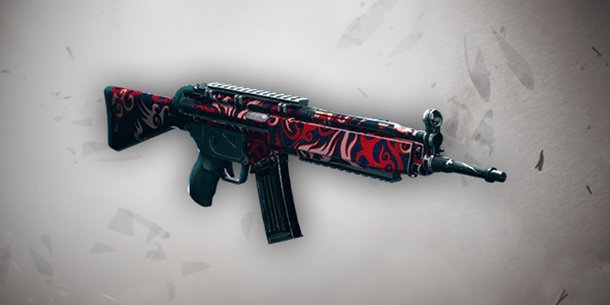

This guide will show you how to claim the Fire Weapon Skin (only available to BETA players)

1) Download the attachment and extract it somewhere


2) Navigate to C:\Program Files (x86)\Ubisoft\Ubisoft Game Launcher\savegames\<your uplay account>\635


3) Replace the .save file in that 635 folder with the save file found from step 1

4) Open your uPlay client, go to settings and check off "Enable cloud save synchronization for supported games"


5) After checking that option off, restart your client and open up R6S.

6) Open up the uPlay overlay (Shift + F2) and you should be able to claim the skin under "Club Rewards". Enjoy!


If you found this tutorial helpful be sure to hit the thanks button, it'll be much appreciated!
save_mpgh.net.zip
#1 · 6y ago
T-800
[MPGH]T-800
//Approved
#2 · 6y ago
SH
Shaunxd
Is it bannable?
#3 · 6y ago
cake
cake
Quote Originally Posted by Shaunxd View Post
Is it bannable?
It's not bannable
#4 · 6y ago
ziadhorat
ziadhorat
I dont have a folder 645
#5 · 6y ago
zainbfaisal
zainbfaisal
I can confirm that it's working for Steam and Uplay versions.
Thanks, would appriciate more Tuts like this in the future.
#6 · 6y ago
MO
molirez
got the skin and rolled back all the settings , cant even switch between my items
#7 · 6y ago
Dynamite
Dynamite
Clever method
#8 · 6y ago
OH
ohoinks
hey, i don't have a folder named "635", just one named "1843", is there a way to fix this? i tried changing the save on the 1843 but it didn't work and creating a folder named 635 and putting the save in it didn't work either
#9 · 6y ago
Alexx
Alexx
Can confirm worked and used a backup of my save after doing this.
#10 · 6y ago
czbt
czbt
Hey, this method worked, but now i cant talk in game chat at all. Any help?
#11 · 6y ago
cake
cake
Quote Originally Posted by czbt View Post
Hey, this method worked, but now i cant talk in game chat at all. Any help?
Enable voice chat in settings
#12 · 6y ago
LO
lol1362
Not working, showing "candidate selection" action
Tried to switch off both steam and uplay cloud save sync but still no..
#13 · 6y ago
OR
oreiner
thanks for this ^^ btw guys if you dont have 645 folder doesnt matter just replace it
#14 · 6y ago
Ciel
Ciel
Still working. Thanks a lot. <3


If you don't find the specified folder just put it in whichever folder you find the 1.save file.
#15 · 6y ago
Posts 1–15 of 39 · Page 1 of 3

Post a Reply

Similar Threads

  • TUTORIAL Modding Weapon Skin [ VIDEO ]By Francesilk in Blackshot Coding & Hacking Tutorials
    10Last post 10y ago
  • [Cod4] Weapon skinning tutorial.By russik1 in Call of Duty 4 - Modern Warfare (MW) Hacks
    6Last post 17y ago
  • Weapon Pointer TUTORIALBy Fortran in WarRock - International Hacks
    120Last post 19y ago
  • make warrock weapons soundless (Tutorial)By floris12345! in WarRock - International Hacks
    11Last post 19y ago
  • warrock weapon skin hackBy slash83 in WarRock - International Hacks
    45Last post 20y ago

Tags for this Thread

None