Home › Forum › MultiPlayer Game Hacks & Cheats › Other First Person Shooter Hacks › Overwatch Hacks & Cheats › Triggerbot - no HP - 1.12 bypass - 50%+ accuracy
Triggerbot - no HP - 1.12 bypass - 50%+ accuracy
Triggerbot - no HP - 1.12 bypass - 50%+ accuracy
Triggerbot - no HP - 1.12 bypass - 50%+ accuracy
Where is it?
Triggerbot - no HP - 1.12 bypass - 50%+ accuracy
Triggerbot - no HP - 1.12 bypass - 50%+ accuracy
Is only free triggerbot working in QP Ranked, Is a triggerbot, not a aimbot or a flikschoot
Run it - Press checkbox and center blue box over trigger
Run game windowed mode - resolution doesn't matter
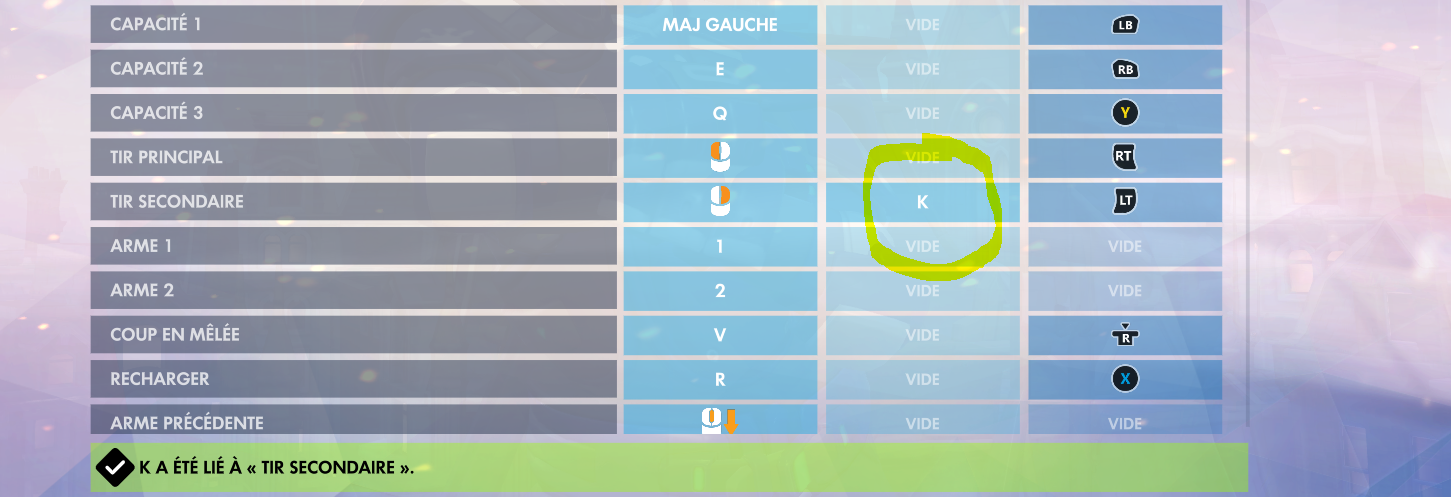
Bind key "k" to fire. Primari fire
This is the first of its kind. It's a conditional color triggerbot where the triggering pixels have to be adjacent to two other triggering pixels and there needs to be a minimum of a few pixels triggered. If there's more pixels with 4 adjacent triggering pixels than 2 then the triggerbot won't fire. So for example if there is a blob of red pixels the triggerbot will know it's a blob and not fire but if it's a line it'll know it's a line. The triggerbot requires that the line have X and Y variation so the triggerbot is more likely to fire when it's over the target rather than to the side of it. AHK and other aimbots are total crap. They are extremely limited in what they can do and don't cut it anymore.
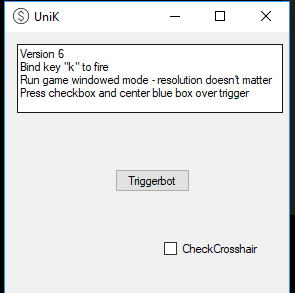
https://www.virustotal.com/#/file/e4...40a6/detection
1. Download Microsoft visual studio (free download at Microsof*****m).
2. After installing Visual Basic. Run it and open new project > Visual Basic > Windows Classic Desktop > Windows Form App (.net Framework)
3. On Form1 simply place a button and checkbox on the form from the toolbox.
4. Double click form1 on the right and paste the following code:
5. Go to Build > Build the exe
Code:
    Imports System.Runtime.InteropServices


    Public Class Form1
        'version 6
        Private Declare Function GetTickCount Lib "kernel32" () As UInt32
        Public t As New Timer With {.Interval = 1}
        Public ScanRange As Long = 25

        Public Pixels(ScanRange * ScanRange + ScanRange) As Integer
        Public Pixels_Hue(ScanRange * ScanRange + ScanRange) As Single
        Public Pixels_Brightness(ScanRange * ScanRange + ScanRange) As Single
        Public Pixels_Saturation(ScanRange * ScanRange + ScanRange) As Single
        Public LastFireTick As UInteger

        'edit values below to modify triggerbot
        'autofire delay - 510 for mccree and 1400 for widow
        Public FireDelayRightMouseDown As UInteger = 1400 'autofire delay when right mouse is down
        Public FireDelayRightMouseUp As UInteger = 510 'autofire delay when right mouse is up
        Public ScanRangeRightMouseDown As Long = 25  'amount of pixels to scan for sniper - right click down
        Public ScanRangeRightMouseUp As Long = 21 'amount of pixels to scan for right click up
        Public RedOrangeRange As Single = 13 ' adjust down to decrease targeting orange
        Public RedVioletRange As Single = 346 ' adjust up to decrease targeting violet
        Public AdjustDown As Integer = 0 'optional - move scanning up/down depending on where window is - negative values allowed
        Public AdjustRight As Integer = 0  'optional - move scanning left/right depending on where window is - negative values allowed


        <DllImport("user32.dll")>
        Shared Function GetAsyncKeyState(ByVal vKey As System.Windows.Forms.Keys) As Short
        End Function

        Private Const VK_RBUTTON = &H2
        Private Const VK_LBUTTON = &H1
        Private Const VK_Q = &H51

        <DllImport("user32.dll")>
        Private Shared Function ReleaseDC(ByVal hWnd As IntPtr, ByVal hDc As IntPtr) As IntPtr
        End Function
        <DllImport("user32.dll", SetLastError:=True)>
        Private Shared Function GetActiveWindow() As IntPtr
        End Function
        <DllImport("gdi32")>
        Public Shared Function BitBlt(ByVal hDestDC As IntPtr, ByVal X As Integer, ByVal Y As Integer, ByVal nWidth As Integer, ByVal nHeight As Integer, ByVal hSrcDC As IntPtr, ByVal SrcX As Integer, ByVal SrcY As Integer, ByVal Rop As Integer) As Boolean
        End Function
        Dim GCH As GCHandle = GCHandle.Alloc(Pixels, GCHandleType.Pinned)

        Dim Bmp As New Drawing.Bitmap(ScanRange, ScanRange, 4 * ScanRange,
                                      Imaging.PixelFormat.Format32bppArgb,
                                      GCH.AddrOfPinnedObject)

        <DllImport("user32.dll")>
        Private Shared Function GetWindowDC(ByVal hwnd As IntPtr) As IntPtr
        End Function

        Declare Function GetWindowRect Lib "user32.dll" (
    ByVal hwnd As Int32,
    ByRef lpRect As Rectangle) As Int32


        Private Sub Button1_Click(sender As Object, e As EventArgs) Handles Button1.Click
            If t.Enabled = 0 Then
                Button1.Text = "STOP"
                t.Enabled = 1
            Else
                Button1.Text = "START"
                t.Enabled = 0
            End If
        End Sub

        Private Sub Form1_Load(sender As Object, e As EventArgs) Handles MyBase.Load
            AddHandler t.Tick, AddressOf Timer_tick
            If FireDelayRightMouseDown < 100 Then FireDelayRightMouseDown = 100 ' don't make this too low to avoid suspicion - to make it lower use keypressdown and keypressup
            If FireDelayRightMouseUp < 100 Then FireDelayRightMouseUp = 100 ' don't make this too low to avoid suspicion - to make it lower use keypressdown and keypressup
        End Sub
        Private Sub Timer_tick(sender As Object, e As EventArgs)
            RunAimbot()
        End Sub


        Public Sub RunAimbot()

            Dim Amountfound As Long
            Dim AmountfoundCC1 As Long
            Dim CCAmount(0 To 30) As Long
            Dim I As Long

            Dim lowestX As Long
            Dim lowestY As Long
            Dim highestX As Long
            Dim highestY As Long

            lowestX = 900
            lowestY = 900

            Dim avgHUE As Single
            Dim avgBrightness As Single
            Dim avgsaturation As Single
            Dim AMountOfPixels As Single
            Dim FireTriggered As Single

            Dim YW As Single
            Dim X As Single
            Dim Y As Single

            Dim YW2 As Single
            Dim X2 As Single
            Dim Y2 As Single
            Dim YWY As Integer
            Dim YW2Y2 As Integer
            Dim CombinedLineFigure As Long

            Dim screenwidth = CInt(Screen.PrimaryScreen.Bounds.Width)
            Dim screenheight = CInt(Screen.PrimaryScreen.Bounds.Height)

            Dim g As Graphics
            Dim hdcDest As IntPtr = IntPtr.Zero
            Dim desktopHandleDC As IntPtr = IntPtr.Zero
            Dim desktopHandle As IntPtr

            'change scan size based on whether mouse in down or up

            If CheckRightMouse() = 0 Then
                ScanRange = ScanRangeRightMouseUp 'settings for right mouse up
            Else
                ScanRange = ScanRangeRightMouseDown 'settings for right mouse down
            End If


            desktopHandle = GetActiveWindow()


            Dim R As Rectangle = New Rectangle(CInt((Screen.PrimaryScreen.Bounds.Width / 2) - (ScanRange / 2)) + AdjustRight, CInt((Screen.PrimaryScreen.Bounds.Height / 2) - (ScanRange / 2)) + AdjustDown, ScanRange, ScanRange)


            Bmp = New Bitmap(ScanRange, ScanRange, 4 * ScanRange,
                                          Imaging.PixelFormat.Format32bppArgb,
                                          GCH.AddrOfPinnedObject)


            g = Graphics.FromImage(Bmp)
            desktopHandleDC = GetWindowDC(desktopHandle)
            hdcDest = g.GetHdc

            Dim gf As Integer
            Dim GH As Rectangle


            gf = GetWindowRect(desktopHandle, GH)


            Dim NewRectWidth As Integer
            Dim NewRectheight As Integer
            NewRectWidth = GH.Width - GH.Left
            NewRectheight = GH.Height - GH.Top


            BitBlt(hdcDest, 0, 0, ScanRange, ScanRange, desktopHandleDC, CInt((screenwidth / 2) - (ScanRange / 2) + AdjustRight), CInt((screenheight / 2) - (ScanRange / 2) + AdjustDown), CopyPixelOperation.SourceCopy)


            g.ReleaseHdc(hdcDest)
            ReleaseDC(desktopHandle, desktopHandleDC)
            Bmp.Dispose()
            g.Dispose() : g = Nothing


            Dim myColor As Color


            AMountOfPixels = ScanRange * ScanRange
            For X = 2 To ScanRange - 3
                YW = X * ScanRange
                For Y = 2 To ScanRange - 3
                    YWY = YW + Y
                    myColor = Color.FromArgb((Pixels(YWY)))

                    Pixels_Hue(YWY) = myColor.GetHue
                    Pixels_Brightness(YWY) = myColor.GetBrightness
                    Pixels_Saturation(YWY) = myColor.GetSaturation


                    avgHUE = avgHUE + Pixels_Hue(YWY)
                    avgBrightness = avgBrightness + Pixels_Brightness(YWY)
                    avgsaturation = avgsaturation + Pixels_Saturation(YWY)


                    If Pixels_Hue(YWY) < RedOrangeRange Or Pixels_Hue(YWY) > RedVioletRange Then
                        If Pixels_Brightness(YWY) > 0.25 And Pixels_Brightness(YWY) < 0.65 And Pixels_Saturation(YWY) > 0.25 Then ' Target by hue to bypass 1.12

                            Amountfound = Amountfound + 1

                            'DEBUG
                            'RichTextBox1.AppendText("HUE=" & (myColor.GetHue()).ToString & vbTab & "SAT=" & myColor.GetSaturation().ToString & vbTab & "BGT=" & (myColor.GetBrightness()).ToString & vbTab & myColor.R & vbNewLine)

                            If lowestX > X Then
                                lowestX = X
                            End If
                            If lowestY > Y Then
                                lowestY = Y
                            End If
                            If highestY < Y Then
                                highestY = Y
                            End If
                            If highestX < X Then
                                highestX = X
                            End If

                            'advanced comparison

                            For X2 = (X - 2) To (X + 2)
                                YW2 = X2 * ScanRange
                                For Y2 = (Y - 2) To (Y + 2)
                                    YW2Y2 = YW2 + Y2
                                    'x2=0 and y2=0 produces additional triggered pixel

                                    If Pixels_Hue(YW2Y2) < RedOrangeRange Or Pixels_Hue(YW2Y2) > RedVioletRange Then
                                        If Pixels_Brightness(YW2Y2) > 0.25 And Pixels_Brightness(YW2Y2) < 0.65 And Pixels_Saturation(YW2Y2) > 0.25 Then ' Target by hue to bypass 1.12
                                            AmountfoundCC1 = AmountfoundCC1 + 1
                                        End If
                                    End If

                                Next Y2
                            Next X2


                            CCAmount(AmountfoundCC1) = CCAmount(AmountfoundCC1) + 1
                            AmountfoundCC1 = 0


                        End If
                    End If
    NExtY:
                Next Y
            Next X
            'combine line figures together
            If CheckRightMouse() = 0 Then
                For I = 5 To 11
                    CombinedLineFigure = CombinedLineFigure + CCAmount(I)  'settings for right mouse up
                Next I
            Else
                For I = 5 To 15
                    CombinedLineFigure = CombinedLineFigure + CCAmount(I)  'settings for right mouse down
                Next I
            End If
            '   CombinedLineFigure = CombinedLineFigure * 5
            ' RichTextBox1.AppendText("CombinedLineFigure=" & CombinedLineFigure & vbTab & "Amountfound=" & Amountfound & vbNewLine)


            If CombinedLineFigure >= (ScanRange * 0.5) And (CombinedLineFigure * 2) >= Amountfound Then


                If (lowestX + (ScanRange * 0.3)) <= highestX And (lowestY + (ScanRange * 0.3)) <= highestY Then

                    FireTriggered = 1
                    ' RichTextBox1.AppendText("CombinedLineFigure=" & CombinedLineFigure & vbTab & "Amountfound=" & Amountfound & vbNewLine)
                    ' RichTextBox1.AppendText("Fire" & vbNewLine)

                End If

            End If


            avgHUE = avgHUE / AMountOfPixels
            avgBrightness = avgBrightness / AMountOfPixels
            avgsaturation = avgsaturation / AMountOfPixels

            If avgHUE > 2 And avgHUE < 14 And avgBrightness < 0.45 And avgsaturation < 0.45 Then
                FireTriggered = 0 ' don't fire
            End If

            If CheckKeyQ() = 1 And CheckRightMouse() = 0 Then
                LastFireTick = GetTickCount + 5000 'pressing Q for ultimate delays firing by 5 secs when mouse is up.  With widow use ultimate while zoomed to avoid delay.
            End If

            If FireTriggered = 1 Then
                Fire()
            End If


            'debug and testing
            '  If LastFireTick = GetTickCount Then
            '  RichTextBox1.AppendText("CombinedLineFigure=" & CombinedLineFigure & vbTab & "Amountfound=" & Amountfound & vbNewLine)
            ' RichTextBox1.Text = ("avgHUE=" & avgHUE & vbTab & "avgSAT=" & avgsaturation & vbTab & "avgBGT=" & avgBrightness)
            ' RichTextBox1.AppendText  ("avgHUE=" & avgHUE & vbTab & "avgSAT=" & avgsaturation & vbTab & "avgBGT=" & avgBrightness & vbNewLine)

            'Dim i2 As Long
            ' For i2 = 0 To 18
            ' RichTextBox1.AppendText(CCAmount(i2) & vbTab)
            ' Next
            ' RichTextBox1.AppendText(vbNewLine)

            ' End If

        End Sub
        Public Sub Fire()
            If (LastFireTick + FireDelayRightMouseDown) <= GetTickCount And CheckRightMouse() = 1 Then GoTo Fire
            If (LastFireTick + FireDelayRightMouseUp) <= GetTickCount And CheckRightMouse() = 0 Then
    Fire:
                If CheckLeftMouse() = 0 Then 'don't fire when mouse is being manually clicked
                    SendKeys.Send("k")
                    '  RichTextBox1.AppendText("avgHUE=" & avgHUE & vbTab & "avgSAT=" & avgsaturation & vbTab & "avgBGT=" & avgBrightness & vbNewLine)
                End If
                LastFireTick = GetTickCount
            End If
        End Sub
        Public Function CheckRightMouse() As Long
            If GetAsyncKeyState(VK_RBUTTON) <> 0 Then
                Return 1
            End If
        End Function
        Public Function CheckLeftMouse() As Long
            If GetAsyncKeyState(VK_LBUTTON) <> 0 Then
                Return 1
            End If
        End Function
        Public Function CheckKeyQ() As Long
            If GetAsyncKeyState(VK_Q) <> 0 Then
                Return 1
            End If
        End Function

        Private Sub CheckBox1_CheckedChanged(sender As Object, e As EventArgs) Handles CheckBox1.CheckedChanged
            Dim i As Long
            Application.DoEvents()
            Using g As Graphics = Graphics.FromHwnd(IntPtr.Zero)
                Dim rect As Rectangle = New Rectangle((Screen.PrimaryScreen.Bounds.Width / 2) - (ScanRange / 2) + AdjustRight, (Screen.PrimaryScreen.Bounds.Height / 2) - (ScanRange / 2) + AdjustDown, ScanRange, ScanRange)
                Using lgb As New Drawing2D.LinearGradientBrush(rect, Color.Blue, Color.Blue, 90, True)
                    For i = 0 To 999
                        g.FillRectangle(lgb, rect)
                        Application.DoEvents()
                        If Not CheckBox1.CheckState = CheckState.Checked Then Exit Sub
                    Next i
                End Using
            End Using
            CheckBox1.CheckState = CheckState.Unchecked
        End Sub


    End Class
link is broken
Download Link Broken D:
 Originally Posted by revivedynera


Someone want to comment if it works and is safe? I highly doubt it since no ones has already.
It works as listed here, but it doesn't work that well. It's very very very slow, and further the enemy the slower it shoots, you're better off just aiming normally.
Tu es fr !
Cool !
Déja je n'arrive pas a le faire marcher ton tire automatique.
J'ai suivis toutes les étapes, mais pourtant ton logiciel ne marche pas, sur moi !
(Sur la photo, la touche associé est sur tir secondaire alors que tu dis que c'est la touche "Primari fire")
J'ai testé les deux (K -> Tire Principale / Secondaire), j'ai bien mis mon réticule de visée sur le carré bleu en mode fenêtré ! (j'ai même testé en mode sans bordure)
Rien n'y fait...
Bien cordiallement.
Falatare
- - - Updated - - -
Already I can not make it work your automatic pull. I followed all the steps, but yet your software doesn't work on me! (In the photo, the associated key is on secondary shooting while you say that it is the key "Primari Fire") I tested both (K-> main/Secondary pull), I put my crosshairs in sight on the blue square in windowed mode! (I even tested in borderless mode) Nothing is done... Very cordially. Falatare
Cool !
Déja je n'arrive pas a le faire marcher ton tire automatique.
J'ai suivis toutes les étapes, mais pourtant ton logiciel ne marche pas, sur moi !
(Sur la photo, la touche associé est sur tir secondaire alors que tu dis que c'est la touche "Primari fire")
J'ai testé les deux (K -> Tire Principale / Secondaire), j'ai bien mis mon réticule de visée sur le carré bleu en mode fenêtré ! (j'ai même testé en mode sans bordure)
Rien n'y fait...
Bien cordiallement.
Falatare
- - - Updated - - -
Already I can not make it work your automatic pull. I followed all the steps, but yet your software doesn't work on me! (In the photo, the associated key is on secondary shooting while you say that it is the key "Primari Fire") I tested both (K-> main/Secondary pull), I put my crosshairs in sight on the blue square in windowed mode! (I even tested in borderless mode) Nothing is done... Very cordially. Falatare
Originally Posted by falatare
- - - Updated - - -
Version 7
Now that the triggerbot is decently firing when a target is near next ver is going to fire when the crosshair is actually inside the target rather than near the target. Might have to rework this so it could take up to a few days.
Code:
Imports System.Runtime.InteropServices


Public Class Form1
    'version 7
    Private Declare Function GetTickCount Lib "kernel32" () As UInt32
    Public t As New Timer With {.Interval = 1}
    Public ScanRange As Long = 26

    Public Pixels(ScanRange * ScanRange + ScanRange) As Integer
    Public Pixels_Hue(ScanRange * ScanRange + ScanRange) As Single
    Public Pixels_Brightness(ScanRange * ScanRange + ScanRange) As Single
    Public Pixels_Saturation(ScanRange * ScanRange + ScanRange) As Single
    Public Pixels_R(ScanRange * ScanRange + ScanRange) As Single
    Public LastFireTick As UInteger

    'edit values below to modify triggerbot
    'autofire delay - 510 for mccree and 1400 for widow
    Public FireDelayRightMouseDown As UInteger = 1400 'autofire delay when right mouse is down
    Public FireDelayRightMouseUp As UInteger = 410 'autofire delay when right mouse is up
    Public ScanRangeRightMouseDown As Long = 26  'amount of pixels to scan for sniper - right click down
    Public ScanRangeRightMouseUp As Long = 22 'amount of pixels to scan for right click up
    Public AdjustDown As Integer = 0 'optional - move scanning up/down depending on where window is - negative values allowed
    Public AdjustRight As Integer = 0  'optional - move scanning left/right depending on where window is - negative values allowed
    Public RedOrangeRange As Single = 13 ' adjust down to decrease targeting orange
    Public RedVioletRange As Single = 346 ' adjust up to decrease targeting violet
    Public MinBrightness As Single = 0.25 'minimum brightness of pixel range (0-1.00)
    Public MaxBrightness As Single = 0.65 'maximum brightness of pixel range (0-1.00)
    Public MinSaturation As Single = 0.25 'minimum saturation of pixel range (0-1.00)
    Public MinRed As Single = 150 'minimum red value of pixel (0-255) - set lower for darker maps


    <DllImport("user32.dll")>
    Shared Function GetAsyncKeyState(ByVal vKey As System.Windows.Forms.Keys) As Short
    End Function

    Private Const VK_RBUTTON = &H2
    Private Const VK_LBUTTON = &H1
    Private Const VK_Q = &H51

    <DllImport("user32.dll")>
    Private Shared Function ReleaseDC(ByVal hWnd As IntPtr, ByVal hDc As IntPtr) As IntPtr
    End Function
    <DllImport("user32.dll", SetLastError:=True)>
    Private Shared Function GetActiveWindow() As IntPtr
    End Function
    <DllImport("gdi32")>
    Public Shared Function BitBlt(ByVal hDestDC As IntPtr, ByVal X As Integer, ByVal Y As Integer, ByVal nWidth As Integer, ByVal nHeight As Integer, ByVal hSrcDC As IntPtr, ByVal SrcX As Integer, ByVal SrcY As Integer, ByVal Rop As Integer) As Boolean
    End Function
    Dim GCH As GCHandle = GCHandle.Alloc(Pixels, GCHandleType.Pinned)

    Dim Bmp As New Drawing.Bitmap(ScanRange, ScanRange, 4 * ScanRange,
                                  Imaging.PixelFormat.Format32bppArgb,
                                  GCH.AddrOfPinnedObject)

    <DllImport("user32.dll")>
    Private Shared Function GetWindowDC(ByVal hwnd As IntPtr) As IntPtr
    End Function

    Declare Function GetWindowRect Lib "user32.dll" (
ByVal hwnd As Int32,
ByRef lpRect As Rectangle) As Int32


    Private Sub Button1_Click(sender As Object, e As EventArgs) Handles Button1.Click
        If t.Enabled = 0 Then
            Button1.Text = "STOP"
            t.Enabled = 1
        Else
            Button1.Text = "START"
            t.Enabled = 0
        End If
    End Sub

    Private Sub Form1_Load(sender As Object, e As EventArgs) Handles MyBase.Load
        AddHandler t.Tick, AddressOf Timer_tick
        If FireDelayRightMouseDown < 100 Then FireDelayRightMouseDown = 100 ' don't make this too low to avoid suspicion - to make it lower use keypressdown and keypressup
        If FireDelayRightMouseUp < 100 Then FireDelayRightMouseUp = 100 ' don't make this too low to avoid suspicion - to make it lower use keypressdown and keypressup
    End Sub
    Private Sub Timer_tick(sender As Object, e As EventArgs)
        RunAimbot()
    End Sub


    Public Sub RunAimbot()

        Dim Amountfound As Long
        Dim AmountfoundCC1 As Long
        Dim CCAmount(0 To 1000) As Long
        Dim I As Long

        Dim lowestX As Long
        Dim lowestY As Long
        Dim highestX As Long
        Dim highestY As Long

        lowestX = 900
        lowestY = 900

        Dim avgHUE As Single
        Dim avgBrightness As Single
        Dim avgsaturation As Single
        Dim AMountOfPixels As Single
        Dim FireTriggered As Single

        Dim YW As Single
        Dim X As Single
        Dim Y As Single

        Dim YW2 As Single
        Dim X2 As Single
        Dim Y2 As Single
        Dim YWY As Integer
        Dim YW2Y2 As Integer
        Dim CombinedLineFigure As Long

        Dim screenwidth = CInt(Screen.PrimaryScreen.Bounds.Width)
        Dim screenheight = CInt(Screen.PrimaryScreen.Bounds.Height)

        Dim g As Graphics
        Dim hdcDest As IntPtr = IntPtr.Zero
        Dim desktopHandleDC As IntPtr = IntPtr.Zero
        Dim desktopHandle As IntPtr

        'change scan size based on whether mouse in down or up

        If CheckRightMouse() = 0 Then
            ScanRange = ScanRangeRightMouseUp 'settings for right mouse up
        Else
            ScanRange = ScanRangeRightMouseDown 'settings for right mouse down
        End If


        desktopHandle = GetActiveWindow()


        Dim R As Rectangle = New Rectangle(CInt((Screen.PrimaryScreen.Bounds.Width / 2) - (ScanRange / 2)) + AdjustRight, CInt((Screen.PrimaryScreen.Bounds.Height / 2) - (ScanRange / 2)) + AdjustDown, ScanRange, ScanRange)


        Bmp = New Bitmap(ScanRange, ScanRange, 4 * ScanRange,
                                      Imaging.PixelFormat.Format32bppArgb,
                                      GCH.AddrOfPinnedObject)


        g = Graphics.FromImage(Bmp)
        desktopHandleDC = GetWindowDC(desktopHandle)
        hdcDest = g.GetHdc

        Dim gf As Integer
        Dim GH As Rectangle


        gf = GetWindowRect(desktopHandle, GH)


        Dim NewRectWidth As Integer
        Dim NewRectheight As Integer
        NewRectWidth = GH.Width - GH.Left
        NewRectheight = GH.Height - GH.Top


        BitBlt(hdcDest, 0, 0, ScanRange, ScanRange, desktopHandleDC, CInt((screenwidth / 2) - (ScanRange / 2) + AdjustRight), CInt((screenheight / 2) - (ScanRange / 2) + AdjustDown), CopyPixelOperation.SourceCopy)


        g.ReleaseHdc(hdcDest)
        ReleaseDC(desktopHandle, desktopHandleDC)
        Bmp.Dispose()
        g.Dispose() : g = Nothing


        Dim myColor As Color


        AMountOfPixels = ScanRange * ScanRange
        For X = 3 To ScanRange - 4
            YW = X * ScanRange
            For Y = 3 To ScanRange - 4
                YWY = YW + Y
                myColor = Color.FromArgb((Pixels(YWY)))

                Pixels_Hue(YWY) = myColor.GetHue
                Pixels_Brightness(YWY) = myColor.GetBrightness
                Pixels_Saturation(YWY) = myColor.GetSaturation
                Pixels_R(YWY) = myColor.R

                avgHUE = avgHUE + Pixels_Hue(YWY)
                avgBrightness = avgBrightness + Pixels_Brightness(YWY)
                avgsaturation = avgsaturation + Pixels_Saturation(YWY)


                If Pixels_Hue(YWY) < RedOrangeRange Or Pixels_Hue(YWY) > RedVioletRange Then
                    If Pixels_Brightness(YWY) > MinBrightness And Pixels_Brightness(YWY) < MaxBrightness And Pixels_Saturation(YWY) > MinSaturation And Pixels_R(YWY) > MinRed Then ' Target by hue to bypass 1.12

                        Amountfound = Amountfound + 1

                        'DEBUG
                        ' RichTextBox1.AppendText("HUE=" & (myColor.GetHue()).ToString & vbTab & "SAT=" & myColor.GetSaturation().ToString & vbTab & "BGT=" & (myColor.GetBrightness()).ToString & vbTab & myColor.R & vbNewLine)

                        If lowestX > X Then
                            lowestX = X
                        End If
                        If lowestY > Y Then
                            lowestY = Y
                        End If
                        If highestY < Y Then
                            highestY = Y
                        End If
                        If highestX < X Then
                            highestX = X
                        End If

                        'advanced comparison

                        For X2 = (X - 3) To (X + 3)
                            YW2 = X2 * ScanRange
                            For Y2 = (Y - 3) To (Y + 3)
                                YW2Y2 = YW2 + Y2
                                'x2=0 and y2=0 produces additional triggered pixel

                                If Pixels_Hue(YW2Y2) < RedOrangeRange Or Pixels_Hue(YW2Y2) > RedVioletRange Then
                                    If Pixels_Brightness(YW2Y2) > MinBrightness And Pixels_Brightness(YW2Y2) < MaxBrightness And Pixels_Saturation(YW2Y2) > MinSaturation And Pixels_R(YW2Y2) > MinRed Then ' Target by hue to bypass 1.12
                                        AmountfoundCC1 = AmountfoundCC1 + 1
                                    End If
                                End If

                            Next Y2
                        Next X2


                        CCAmount(AmountfoundCC1) = CCAmount(AmountfoundCC1) + 1
                        AmountfoundCC1 = 0


                    End If
                End If
NExtY:
            Next Y
        Next X
        'combine line figures together
        If CheckRightMouse() = 0 Then
            For I = 1 To 13
                CombinedLineFigure = CombinedLineFigure + CCAmount(I)  'settings for right mouse up
            Next I
        Else
            For I = 2 To 19
                CombinedLineFigure = CombinedLineFigure + CCAmount(I)  'settings for right mouse down
            Next I
        End If


        '   CombinedLineFigure = CombinedLineFigure * 10
        ' RichTextBox1.AppendText("CombinedLineFigure=" & CombinedLineFigure & vbTab & "Amountfound=" & Amountfound & vbNewLine)


        If CombinedLineFigure >= (ScanRange * 0.5) And (CombinedLineFigure * 1.33) >= Amountfound Then


            If (lowestX + (ScanRange * 0.19)) <= highestX And (lowestY + (ScanRange * 0.19)) <= highestY Then

                FireTriggered = 1
                ' RichTextBox1.AppendText("CombinedLineFigure=" & CombinedLineFigure & vbTab & "Amountfound=" & Amountfound & vbNewLine)
                ' RichTextBox1.AppendText("Fire" & vbNewLine)

            End If

        End If


        avgHUE = avgHUE / AMountOfPixels
        avgBrightness = avgBrightness / AMountOfPixels
        avgsaturation = avgsaturation / AMountOfPixels

        If avgHUE > 2 And avgHUE < 14 And avgBrightness < 0.45 And avgsaturation < 0.45 Then
            FireTriggered = 0 ' don't fire
        End If

        If CheckKeyQ() = 1 And CheckRightMouse() = 0 Then
            LastFireTick = GetTickCount + 5000 'pressing Q for ultimate delays firing by 5 secs when mouse is up.  With widow use ultimate while zoomed to avoid delay.
        End If

        If FireTriggered = 1 Then
            Fire()
        End If


        'debug and testing
        '  If LastFireTick = GetTickCount Then
        ' RichTextBox1.AppendText("CombinedLineFigure=" & CombinedLineFigure & vbTab & "Amountfound=" & Amountfound & vbNewLine)
        ' RichTextBox1.Text = ("avgHUE=" & avgHUE & vbTab & "avgSAT=" & avgsaturation & vbTab & "avgBGT=" & avgBrightness)
        ' RichTextBox1.AppendText("avgHUE=" & avgHUE & vbTab & "avgSAT=" & avgsaturation & vbTab & "avgBGT=" & avgBrightness & vbNewLine)
        'RichTextBox1.AppendText("low_x= " & lowestX & "high_x= " & highestX & "low_y= " & lowestY & "high_y= " & highestY)

        '   Dim i2 As Long
        '  For i2 = 0 To 30
        '  RichTextBox1.AppendText(CCAmount(i2) & vbTab)
        '  Next
        'RichTextBox1.AppendText(vbNewLine)

        ' End If

    End Sub
    Public Sub Fire()
        If (LastFireTick + FireDelayRightMouseDown) <= GetTickCount And CheckRightMouse() = 1 Then GoTo Fire
        If (LastFireTick + FireDelayRightMouseUp) <= GetTickCount And CheckRightMouse() = 0 Then
Fire:
            If CheckLeftMouse() = 0 Then 'don't fire when mouse is being manually clicked
                SendKeys.Send("k")
                '  RichTextBox1.AppendText("avgHUE=" & avgHUE & vbTab & "avgSAT=" & avgsaturation & vbTab & "avgBGT=" & avgBrightness & vbNewLine)
            End If
            LastFireTick = GetTickCount
        End If
    End Sub
    Public Function CheckRightMouse() As Long
        If GetAsyncKeyState(VK_RBUTTON) <> 0 Then
            Return 1
        End If
        Return 0
    End Function
    Public Function CheckLeftMouse() As Long
        If GetAsyncKeyState(VK_LBUTTON) <> 0 Then
            Return 1
        End If
        Return 0
    End Function
    Public Function CheckKeyQ() As Long
        If GetAsyncKeyState(VK_Q) <> 0 Then
            Return 1
        End If
        Return 0
    End Function

    Private Sub CheckBox1_CheckedChanged(sender As Object, e As EventArgs) Handles CheckBox1.CheckedChanged
        Dim i As Long
        Application.DoEvents()
        Using g As Graphics = Graphics.FromHwnd(IntPtr.Zero)
            Dim rect As Rectangle = New Rectangle((Screen.PrimaryScreen.Bounds.Width / 2) - (ScanRange / 2) + AdjustRight, (Screen.PrimaryScreen.Bounds.Height / 2) - (ScanRange / 2) + AdjustDown, ScanRange, ScanRange)
            Using lgb As New Drawing2D.LinearGradientBrush(rect, Color.Blue, Color.Blue, 90, True)
                For i = 0 To 999
                    g.FillRectangle(lgb, rect)
                    Application.DoEvents()
                    If Not CheckBox1.CheckState = CheckState.Checked Then Exit Sub
                Next i
            End Using
        End Using
        CheckBox1.CheckState = CheckState.Unchecked
    End Sub

    Private Sub FontDialog1_Apply(sender As Object, e As EventArgs)

    End Sub
End Class
Baidu's detecting a Trojan in the virustotal link there...
Hare you a noob? if is a virus you can buid the source and scan it, is same result
this one is not working first one working but its attacking too wall if the wall is red
Triggerbot - no HP - 1.12 bypass - 50%+ accuracy VERSION 8
Triggerbot - no HP - 1.12 bypass - 50%+ accuracy VERSION 8
Works well so far but can be improved even more. To use:
1. Download Microsoft visual studio (free download at Microsof*****m).
2. After installing Visual Basic. Run it and open new project > Visual Basic > Windows Classic Desktop > Windows Form App (.net Framework)
3. On Form1 simply place a button and checkbox on the form from the toolbox.
4. Double click form1 on the right and paste the following code:
5. Go to Build > Build the exe
6. Run it - Press checkbox and center blue box over trigger
7. Run game windowed mode - resolution doesn't matter
8. Bind key "k" to fire.
Works well so far but can be improved even more. To use:
1. Download Microsoft visual studio (free download at Microsof*****m).
2. After installing Visual Basic. Run it and open new project > Visual Basic > Windows Classic Desktop > Windows Form App (.net Framework)
3. On Form1 simply place a button and checkbox on the form from the toolbox.
4. Double click form1 on the right and paste the following code:
5. Go to Build > Build the exe
6. Run it - Press checkbox and center blue box over trigger
7. Run game windowed mode - resolution doesn't matter
8. Bind key "k" to fire.
Code:
Imports System.Runtime.InteropServices


Public Class Form1
    'version 8
    'recommended to use with Mccree

    Private Declare Function GetTickCount Lib "kernel32" () As UInt32
    Public t As New Timer With {.Interval = 1}
    Public ScanRange As Long = 50

    Public Pixels(ScanRange * ScanRange + ScanRange) As Integer
    Public Pixels_Hue(ScanRange * ScanRange + ScanRange) As Single
    Public Pixels_Brightness(ScanRange * ScanRange + ScanRange) As Single
    Public Pixels_Saturation(ScanRange * ScanRange + ScanRange) As Single
    Public Pixels_R(ScanRange * ScanRange + ScanRange) As Single
    Public LastFireTick As UInteger

    Dim AmountOfPureWhiteFound As Long

    'edit values below to modify triggerbot
    'autofire delay - 510 for mccree - 1400 for widow
    Public FireDelayRightMouseDown As UInteger = 1400 'autofire delay when right mouse is down
    Public FireDelayRightMouseUp As UInteger = 510 'autofire delay when right mouse is up
    Public ScanRangeRightMouseDown As Long = 50  'amount of pixels to scan for sniper - right click down
    Public ScanRangeRightMouseUp As Long = 25 'amount of pixels to scan for right click up
    Public AdjustDown As Integer = -1 'optional - move scanning up/down depending on where window is - negative values allowed
    Public AdjustRight As Integer = -1  'optional - move scanning left/right depending on where window is - negative values allowed
    Public RedOrangeRange As Single = 13 ' adjust down to decrease targeting orange
    Public RedVioletRange As Single = 345 ' adjust up to decrease targeting violet
    Public MinBrightness As Single = 0.35 'minimum brightness of pixel range (0-1.00)
    Public MaxBrightness As Single = 0.8 'maximum brightness of pixel range (0-1.00)
    Public MinSaturation As Single = 0.3 'minimum saturation of pixel range (0-1.00)
    Public MinRed As Single = 120 'minimum red value of pixel (0-255) - set lower for darker maps
    'x/y might be inverted
    Public DistanceFromTargetBeforeFiringX As Long = 12 ' maximum distance from target in x and y to fire
    Public DistanceFromTargetBeforeFiringY As Long = 5 ' maximum distance from target in x and y to fire

    Public NonWhiteCrosshair As Long = 1 ' change this to 1 to stop widow from auto firing while in zoom.  Detects pure white crosshair in zoom.


    <DllImport("user32.dll")>
    Shared Function GetAsyncKeyState(ByVal vKey As System.Windows.Forms.Keys) As Short
    End Function

    Private Const VK_RBUTTON = &H2
    Private Const VK_LBUTTON = &H1
    Private Const VK_Q = &H51

    <DllImport("user32.dll")>
    Private Shared Function ReleaseDC(ByVal hWnd As IntPtr, ByVal hDc As IntPtr) As IntPtr
    End Function
    <DllImport("user32.dll", SetLastError:=True)>
    Private Shared Function GetActiveWindow() As IntPtr
    End Function
    <DllImport("gdi32")>
    Public Shared Function BitBlt(ByVal hDestDC As IntPtr, ByVal X As Integer, ByVal Y As Integer, ByVal nWidth As Integer, ByVal nHeight As Integer, ByVal hSrcDC As IntPtr, ByVal SrcX As Integer, ByVal SrcY As Integer, ByVal Rop As Integer) As Boolean
    End Function
    Dim GCH As GCHandle = GCHandle.Alloc(Pixels, GCHandleType.Pinned)

    Dim Bmp As New Drawing.Bitmap(ScanRange, ScanRange, 4 * ScanRange,
                                  Imaging.PixelFormat.Format32bppArgb,
                                  GCH.AddrOfPinnedObject)

    <DllImport("user32.dll")>
    Private Shared Function GetWindowDC(ByVal hwnd As IntPtr) As IntPtr
    End Function

    Declare Function GetWindowRect Lib "user32.dll" (
ByVal hwnd As Int32,
ByRef lpRect As Rectangle) As Int32


    Private Sub Button1_Click(sender As Object, e As EventArgs) Handles Button1.Click
        If t.Enabled = 0 Then
            Button1.Text = "STOP"
            t.Enabled = 1
        Else
            Button1.Text = "START"
            t.Enabled = 0
        End If
    End Sub

    Private Sub Form1_Load(sender As Object, e As EventArgs) Handles MyBase.Load
        AddHandler t.Tick, AddressOf Timer_tick
        If FireDelayRightMouseDown < 100 Then FireDelayRightMouseDown = 100 ' don't make this too low to avoid suspicion - to make it lower use keypressdown and keypressup
        If FireDelayRightMouseUp < 100 Then FireDelayRightMouseUp = 100 ' don't make this too low to avoid suspicion - to make it lower use keypressdown and keypressup
    End Sub
    Private Sub Timer_tick(sender As Object, e As EventArgs)
        RunAimbot()
    End Sub


    Public Sub RunAimbot()

        Dim Amountfound As Long
        Dim AmountfoundCC1 As Long
        Dim CCAmount(0 To 1000) As Long
        Dim I As Long

        Dim lowestX As Long
        Dim lowestY As Long
        Dim highestX As Long
        Dim highestY As Long

        Dim TargetX As Long
        Dim TargetY As Long
        Dim TargetAmountFound As Long

        lowestX = 900
        lowestY = 900

        Dim avgHUE As Single
        Dim avgBrightness As Single
        Dim avgsaturation As Single
        Dim AMountOfPixels As Single
        Dim FireTriggered As Single

        Dim YW As Single
        Dim X As Single
        Dim Y As Single

        Dim YW2 As Single
        Dim X2 As Single
        Dim Y2 As Single
        Dim YWY As Integer
        Dim YW2Y2 As Integer
        Dim CombinedLineFigure As Long

        Dim screenwidth = CInt(Screen.PrimaryScreen.Bounds.Width)
        Dim screenheight = CInt(Screen.PrimaryScreen.Bounds.Height)

        Dim g As Graphics
        Dim hdcDest As IntPtr = IntPtr.Zero
        Dim desktopHandleDC As IntPtr = IntPtr.Zero
        Dim desktopHandle As IntPtr

        'change scan size based on whether mouse in down or up

        SetScanRange()


        desktopHandle = GetActiveWindow()


        Dim R As Rectangle = New Rectangle(CInt((Screen.PrimaryScreen.Bounds.Width / 2) - (ScanRange / 2)) + AdjustRight, CInt((Screen.PrimaryScreen.Bounds.Height / 2) - (ScanRange / 2)) + AdjustDown, ScanRange, ScanRange)


        Bmp = New Bitmap(ScanRange, ScanRange, 4 * ScanRange,
                                      Imaging.PixelFormat.Format32bppArgb,
                                      GCH.AddrOfPinnedObject)


        g = Graphics.FromImage(Bmp)
        desktopHandleDC = GetWindowDC(desktopHandle)
        hdcDest = g.GetHdc

        Dim gf As Integer
        Dim GH As Rectangle


        gf = GetWindowRect(desktopHandle, GH)


        Dim NewRectWidth As Integer
        Dim NewRectheight As Integer
        NewRectWidth = GH.Width - GH.Left
        NewRectheight = GH.Height - GH.Top


        BitBlt(hdcDest, 0, 0, ScanRange, ScanRange, desktopHandleDC, CInt((screenwidth / 2) - (ScanRange / 2) + AdjustRight), CInt((screenheight / 2) - (ScanRange / 2) + AdjustDown), CopyPixelOperation.SourceCopy)


        g.ReleaseHdc(hdcDest)
        ReleaseDC(desktopHandle, desktopHandleDC)
        Bmp.Dispose()
        g.Dispose() : g = Nothing


        Dim myColor As Color


        AMountOfPixels = ScanRange * ScanRange

        For X = 3 To ScanRange - 4
            YW = X * ScanRange
            For Y = 3 To ScanRange - 4
                YWY = YW + Y
                myColor = Color.FromArgb((Pixels(YWY)))

                Pixels_Hue(YWY) = myColor.GetHue
                Pixels_Brightness(YWY) = myColor.GetBrightness
                Pixels_Saturation(YWY) = myColor.GetSaturation
                Pixels_R(YWY) = myColor.R

                avgHUE = avgHUE + Pixels_Hue(YWY)
                avgBrightness = avgBrightness + Pixels_Brightness(YWY)
                avgsaturation = avgsaturation + Pixels_Saturation(YWY)

                If NonWhiteCrosshair = 1 Then
                    'sniper zoom fix
                    If Pixels_Hue(YWY) = 0 And Pixels_Saturation(YWY) = 0 And Pixels_Brightness(YWY) = 1 And CheckRightMouse() = 1 And (LastFireTick + FireDelayRightMouseDown) <= GetTickCount Then
                        AmountOfPureWhiteFound = AmountOfPureWhiteFound + 1
                        If AmountOfPureWhiteFound > 20 Then
                            'fix for sniper red in zoom with large scan range =/

                            LastFireTick = LastFireTick + 150
                        End If
                    End If
                End If

                If Pixels_Hue(YWY) < RedOrangeRange Or Pixels_Hue(YWY) > RedVioletRange Then
                    If Pixels_Brightness(YWY) > MinBrightness And Pixels_Brightness(YWY) < MaxBrightness And Pixels_Saturation(YWY) > MinSaturation And Pixels_R(YWY) > MinRed Then ' Target by hue to bypass 1.12

                        Amountfound = Amountfound + 1

                        'DEBUG
                        'RichTextBox1.AppendText("HUE=" & (myColor.GetHue()).ToString & vbTab & "SAT=" & myColor.GetSaturation().ToString & vbTab & "BGT=" & (myColor.GetBrightness()).ToString & vbTab & myColor.R & vbNewLine)

                        If lowestX > X Then
                            lowestX = X
                        End If
                        If lowestY > Y Then
                            lowestY = Y
                        End If
                        If highestY < Y Then
                            highestY = Y
                        End If
                        If highestX < X Then
                            highestX = X
                        End If

                        'advanced comparison

                        For X2 = (X - 3) To (X + 3)
                            YW2 = X2 * ScanRange
                            For Y2 = (Y - 3) To (Y + 3)
                                YW2Y2 = YW2 + Y2
                                'x2=0 and y2=0 produces additional triggered pixel

                                If Pixels_Hue(YW2Y2) < RedOrangeRange Or Pixels_Hue(YW2Y2) > RedVioletRange Then
                                    If Pixels_Brightness(YW2Y2) > MinBrightness And Pixels_Brightness(YW2Y2) < MaxBrightness And Pixels_Saturation(YW2Y2) > MinSaturation And Pixels_R(YW2Y2) > MinRed Then ' Target by hue to bypass 1.12
                                        AmountfoundCC1 = AmountfoundCC1 + 1
                                    End If
                                End If

                            Next Y2
                        Next X2


                        CCAmount(AmountfoundCC1) = CCAmount(AmountfoundCC1) + 1
                        AmountfoundCC1 = 0

                        'target x/y
                        If CheckRightMouse() = 0 Then
                            For I = 1 To 13
                                TargetY = TargetY + Y  'settings for right mouse up
                                TargetX = TargetX + X
                                TargetAmountFound = TargetAmountFound + 1
                            Next I
                        Else
                            For I = 2 To 19
                                TargetY = TargetY + Y  'settings for right mouse down
                                TargetX = TargetX + X
                                TargetAmountFound = TargetAmountFound + 1
                            Next I
                        End If


                    End If
                End If
NExtY:
            Next Y
        Next X
        'combine line figures together
        If CheckRightMouse() = 0 Then
            For I = 1 To 13
                CombinedLineFigure = CombinedLineFigure + CCAmount(I)  'settings for right mouse up
            Next I
        Else
            For I = 2 To 19
                CombinedLineFigure = CombinedLineFigure + CCAmount(I)  'settings for right mouse down
            Next I
        End If


        '   CombinedLineFigure = CombinedLineFigure * 10
        ' RichTextBox1.AppendText("CombinedLineFigure=" & CombinedLineFigure & vbTab & "Amountfound=" & Amountfound & vbNewLine)


        If CombinedLineFigure >= (ScanRange * 0.15) And (CombinedLineFigure * 1.33) >= Amountfound Then


            If (lowestX + (ScanRange * 0.15)) <= highestX And (lowestY + (ScanRange * 0.15)) <= highestY Then

                FireTriggered = 1
                '  RichTextBox1.AppendText("CombinedLineFigure=" & CombinedLineFigure & vbTab & "Amountfound=" & Amountfound & vbNewLine)
                ' RichTextBox1.AppendText("Fire" & vbNewLine)

            End If

        End If


        avgHUE = avgHUE / AMountOfPixels
        avgBrightness = avgBrightness / AMountOfPixels
        avgsaturation = avgsaturation / AMountOfPixels

        If avgHUE > 2 And avgHUE < 14 And avgBrightness < 0.45 And avgsaturation < 0.45 Then
            FireTriggered = 0 ' don't fire
        End If

        If CheckRightMouse() = 0 Then 'adjust for zoom

            If Math.Abs((TargetX / TargetAmountFound) - (ScanRange / 2)) > DistanceFromTargetBeforeFiringX Then
                FireTriggered = 0 ' don't fire
            End If

            If Math.Abs((TargetY / TargetAmountFound) - (ScanRange / 2)) > DistanceFromTargetBeforeFiringY Then
                FireTriggered = 0 ' don't fire
            End If
        Else 'while zoomed / hold down right click
            If Math.Abs((TargetX / TargetAmountFound) - (ScanRange / 2)) > (DistanceFromTargetBeforeFiringX * 2) Then
                FireTriggered = 0 ' don't fire
            End If

            If Math.Abs((TargetY / TargetAmountFound) - (ScanRange / 2)) > (DistanceFromTargetBeforeFiringY * 2) Then
                FireTriggered = 0 ' don't fire
            End If


        End If

        If CheckKeyQ() = 1 And CheckRightMouse() = 0 Then
            LastFireTick = GetTickCount + 5000 'pressing Q for ultimate delays firing by 5 secs when mouse is up.  With widow use ultimate while zoomed to avoid delay.
        End If

        If FireTriggered = 1 Then
            Fire()
        End If


        'debug and testing
        If LastFireTick = GetTickCount Then
            ' RichTextBox1.AppendText("CombinedLineFigure=" & CombinedLineFigure & vbTab & "Amountfound=" & Amountfound & vbNewLine)
            ' RichTextBox1.Text = ("avgHUE=" & avgHUE & vbTab & "avgSAT=" & avgsaturation & vbTab & "avgBGT=" & avgBrightness)
            'RichTextBox1.AppendText("avgHUE=" & avgHUE & vbTab & "avgSAT=" & avgsaturation & vbTab & "avgBGT=" & avgBrightness & vbNewLine)
            'RichTextBox1.AppendText("low_x= " & lowestX & "high_x= " & highestX & "low_y= " & lowestY & "high_y= " & highestY)

            '   Dim i2 As Long
            '  For i2 = 0 To 30
            '  RichTextBox1.AppendText(CCAmount(i2) & vbTab)
            '  Next
            'RichTextBox1.AppendText(vbNewLine)
            '   RichTextBox1.AppendText(Math****und((TargetX / TargetAmountFound) - ScanRange / 2) & " " & (Math****und((TargetY / TargetAmountFound)) - ScanRange / 2) & vbNewLine)

            'moving mouse settings
            'aimbot target X = Math****und((screenwidth / 2) + (TargetX / TargetAmountFound) - ScanRange / 2) + AdjustRight - not tested
            'aimbot target Y = Math****und((screenheight / 2) + (TargetY / TargetAmountFound) - ScanRange / 2) + AdjustDown- not tested
            'Y axis might be reversed - (Y * -1) to fix


            '  RichTextBox1.AppendText(Math****und((screenheight / 2) + (TargetX / TargetAmountFound) - ScanRange / 2) + AdjustRight & vbNewLine)


        End If

    End Sub
    Public Sub Fire()
        If (LastFireTick + FireDelayRightMouseDown) <= GetTickCount And CheckRightMouse() = 1 Then GoTo Fire
        If (LastFireTick + FireDelayRightMouseUp) <= GetTickCount And CheckRightMouse() = 0 Then
Fire:
            If CheckLeftMouse() = 0 Then 'don't fire when mouse is being manually clicked
                SendKeys.Send("k")
                '  RichTextBox1.AppendText("avgHUE=" & avgHUE & vbTab & "avgSAT=" & avgsaturation & vbTab & "avgBGT=" & avgBrightness & vbNewLine)
            End If
            LastFireTick = GetTickCount
        End If
    End Sub
    Public Function CheckRightMouse() As Long
        If GetAsyncKeyState(VK_RBUTTON) <> 0 Then
            Return 1
        End If
        Return 0
    End Function
    Public Function CheckLeftMouse() As Long
        If GetAsyncKeyState(VK_LBUTTON) <> 0 Then
            Return 1
        End If
        Return 0
    End Function
    Public Function CheckKeyQ() As Long
        If GetAsyncKeyState(VK_Q) <> 0 Then
            Return 1
        End If
        Return 0
    End Function
    Public Sub SetScanRange()
        If CheckRightMouse() = 0 Then
            ScanRange = ScanRangeRightMouseUp 'settings for right mouse up
        Else
            ScanRange = ScanRangeRightMouseDown 'settings for right mouse down
        End If

    End Sub


    Private Sub CheckBox1_CheckedChanged(sender As Object, e As EventArgs) Handles CheckBox1.CheckedChanged
        Dim i As Long

        Application.DoEvents()
        Using g As Graphics = Graphics.FromHwnd(IntPtr.Zero)
            For i = 0 To 999
                SetScanRange()
                Dim rect As Rectangle = New Rectangle((Screen.PrimaryScreen.Bounds.Width / 2) - (ScanRange / 2) + AdjustRight, (Screen.PrimaryScreen.Bounds.Height / 2) - (ScanRange / 2) + AdjustDown, ScanRange, ScanRange)
                Using lgb As New Drawing2D.LinearGradientBrush(rect, Color.Blue, Color.Blue, 90, True)

                    g.FillRectangle(lgb, rect)
                    Application.DoEvents()
                    If Not CheckBox1.CheckState = CheckState.Checked Then Exit Sub
                End Using
            Next i
        End Using

        CheckBox1.CheckState = CheckState.Unchecked
    End Sub


End Class
version 9
Code:
Imports System.Runtime.InteropServices


Public Class Form1
    'version 9
    'recommended to use with Mccree

    Private Declare Function GetTickCount Lib "kernel32" () As UInt32
    Public t As New Timer With {.Interval = 1}
    Public ScanRange As Long = 50

    Public Pixels(ScanRange * ScanRange + ScanRange) As Integer
    Public Pixels_Hue(ScanRange * ScanRange + ScanRange) As Single
    Public Pixels_Brightness(ScanRange * ScanRange + ScanRange) As Single
    Public Pixels_Saturation(ScanRange * ScanRange + ScanRange) As Single
    Public Pixels_R(ScanRange * ScanRange + ScanRange) As Single
    Public LastFireTick As UInteger

    Dim AmountOfPureWhiteFound As Long

    'edit values below to modify triggerbot
    'autofire delay - 510 for mccree - 1400 for widow
    Public FireDelayRightMouseDown As UInteger = 1400 'autofire delay when right mouse is down
    Public FireDelayRightMouseUp As UInteger = 510 'autofire delay when right mouse is up
    Public ScanRangeRightMouseDown As Long = 50  'amount of pixels to scan for sniper - right click down
    Public ScanRangeRightMouseUp As Long = 25 'amount of pixels to scan for right click up
    Public AdjustDown As Integer = -1 'optional - move scanning up/down depending on where window is - negative values allowed
    Public AdjustRight As Integer = -1  'optional - move scanning left/right depending on where window is - negative values allowed
    Public RedOrangeRange As Single = 13 ' adjust down to decrease targeting orange
    Public RedVioletRange As Single = 345 ' adjust up to decrease targeting violet
    Public MinBrightness As Single = 0.35 'minimum brightness of pixel range (0-1.00)
    Public MaxBrightness As Single = 0.8 'maximum brightness of pixel range (0-1.00)
    Public MinSaturation As Single = 0.3 'minimum saturation of pixel range (0-1.00)
    Public MinRed As Single = 120 'minimum red value of pixel (0-255) - set lower for darker maps
    'x/y might be inverted
    Public DistanceFromTargetBeforeFiringX As Long = 5 ' maximum distance from target in x to fire
    Public DistanceFromTargetBeforeFiringY As Long = 2 ' maximum distance from target in y to fire

    Public NonWhiteCrosshair As Long = 1 ' change this to 1 to stop widow from auto firing while in zoom.  Crosshair cannot be a pure white for it to work if unzoomed.


    <DllImport("user32.dll")>
    Shared Function GetAsyncKeyState(ByVal vKey As System.Windows.Forms.Keys) As Short
    End Function

    Private Const VK_RBUTTON = &H2
    Private Const VK_LBUTTON = &H1
    Private Const VK_Q = &H51

    <DllImport("user32.dll")>
    Private Shared Function ReleaseDC(ByVal hWnd As IntPtr, ByVal hDc As IntPtr) As IntPtr
    End Function
    <DllImport("user32.dll", SetLastError:=True)>
    Private Shared Function GetActiveWindow() As IntPtr
    End Function
    <DllImport("gdi32")>
    Public Shared Function BitBlt(ByVal hDestDC As IntPtr, ByVal X As Integer, ByVal Y As Integer, ByVal nWidth As Integer, ByVal nHeight As Integer, ByVal hSrcDC As IntPtr, ByVal SrcX As Integer, ByVal SrcY As Integer, ByVal Rop As Integer) As Boolean
    End Function
    Dim GCH As GCHandle = GCHandle.Alloc(Pixels, GCHandleType.Pinned)

    Dim Bmp As New Drawing.Bitmap(ScanRange, ScanRange, 4 * ScanRange,
                                  Imaging.PixelFormat.Format32bppArgb,
                                  GCH.AddrOfPinnedObject)

    <DllImport("user32.dll")>
    Private Shared Function GetWindowDC(ByVal hwnd As IntPtr) As IntPtr
    End Function

    Declare Function GetWindowRect Lib "user32.dll" (
ByVal hwnd As Int32,
ByRef lpRect As Rectangle) As Int32


    Private Sub Button1_Click(sender As Object, e As EventArgs) Handles Button1.Click
        If t.Enabled = 0 Then
            Button1.Text = "STOP"
            t.Enabled = 1
        Else
            Button1.Text = "START"
            t.Enabled = 0
        End If
    End Sub

    Private Sub Form1_Load(sender As Object, e As EventArgs) Handles MyBase.Load
        AddHandler t.Tick, AddressOf Timer_tick
        If FireDelayRightMouseDown < 100 Then FireDelayRightMouseDown = 100 ' don't make this too low to avoid suspicion - to make it lower use keypressdown and keypressup
        If FireDelayRightMouseUp < 100 Then FireDelayRightMouseUp = 100 ' don't make this too low to avoid suspicion - to make it lower use keypressdown and keypressup
    End Sub
    Private Sub Timer_tick(sender As Object, e As EventArgs)
        RunAimbot()
    End Sub


    Public Sub RunAimbot()

        Dim Amountfound As Long
        Dim AmountfoundCC1 As Long
        Dim CCAmount(0 To 1000) As Long
        Dim I As Long

        Dim lowestX As Long
        Dim lowestY As Long
        Dim highestX As Long
        Dim highestY As Long

        Dim TargetX As Long
        Dim TargetY As Long
        Dim TargetAmountFound As Long

        lowestX = 900
        lowestY = 900

        Dim avgHUE As Single
        Dim avgBrightness As Single
        Dim avgsaturation As Single

        Dim avgHueFound As Single
        Dim avgBrightnessFound As Single
        Dim avgsaturationFound As Single


        Dim AMountOfPixels As Single
        Dim FireTriggered As Single

        Dim YW As Single
        Dim X As Single
        Dim Y As Single

        Dim YW2 As Single
        Dim X2 As Single
        Dim Y2 As Single
        Dim YWY As Integer
        Dim YW2Y2 As Integer
        Dim CombinedLineFigure As Long

        Dim screenwidth = CInt(Screen.PrimaryScreen.Bounds.Width)
        Dim screenheight = CInt(Screen.PrimaryScreen.Bounds.Height)

        Dim g As Graphics
        Dim hdcDest As IntPtr = IntPtr.Zero
        Dim desktopHandleDC As IntPtr = IntPtr.Zero
        Dim desktopHandle As IntPtr

        'change scan size based on whether mouse in down or up

        SetScanRange()


        desktopHandle = GetActiveWindow()


        Dim R As Rectangle = New Rectangle(CInt((Screen.PrimaryScreen.Bounds.Width / 2) - (ScanRange / 2)) + AdjustRight, CInt((Screen.PrimaryScreen.Bounds.Height / 2) - (ScanRange / 2)) + AdjustDown, ScanRange, ScanRange)


        Bmp = New Bitmap(ScanRange, ScanRange, 4 * ScanRange,
                                      Imaging.PixelFormat.Format32bppArgb,
                                      GCH.AddrOfPinnedObject)


        g = Graphics.FromImage(Bmp)
        desktopHandleDC = GetWindowDC(desktopHandle)
        hdcDest = g.GetHdc

        Dim gf As Integer
        Dim GH As Rectangle


        gf = GetWindowRect(desktopHandle, GH)


        Dim NewRectWidth As Integer
        Dim NewRectheight As Integer
        NewRectWidth = GH.Width - GH.Left
        NewRectheight = GH.Height - GH.Top


        BitBlt(hdcDest, 0, 0, ScanRange, ScanRange, desktopHandleDC, CInt((screenwidth / 2) - (ScanRange / 2) + AdjustRight), CInt((screenheight / 2) - (ScanRange / 2) + AdjustDown), CopyPixelOperation.SourceCopy)


        g.ReleaseHdc(hdcDest)
        ReleaseDC(desktopHandle, desktopHandleDC)
        Bmp.Dispose()
        g.Dispose() : g = Nothing


        Dim myColor As Color


        AMountOfPixels = ScanRange * ScanRange

        For X = 3 To ScanRange - 4
            YW = X * ScanRange
            For Y = 3 To ScanRange - 4
                YWY = YW + Y
                myColor = Color.FromArgb((Pixels(YWY)))

                Pixels_Hue(YWY) = myColor.GetHue
                Pixels_Brightness(YWY) = myColor.GetBrightness
                Pixels_Saturation(YWY) = myColor.GetSaturation
                Pixels_R(YWY) = myColor.R

                avgHUE = avgHUE + Pixels_Hue(YWY)
                avgBrightness = avgBrightness + Pixels_Brightness(YWY)
                avgsaturation = avgsaturation + Pixels_Saturation(YWY)

                If NonWhiteCrosshair = 1 Then
                    'sniper zoom fix
                    If Pixels_Hue(YWY) = 0 And Pixels_Saturation(YWY) = 0 And Pixels_Brightness(YWY) = 1 And CheckRightMouse() = 1 And (LastFireTick + FireDelayRightMouseDown) <= GetTickCount Then
                        AmountOfPureWhiteFound = AmountOfPureWhiteFound + 1
                        If AmountOfPureWhiteFound > 20 Then
                            'fix for sniper red in zoom with large scan range =/

                            LastFireTick = LastFireTick + 150
                        End If
                    End If
                End If

                If Pixels_Hue(YWY) < RedOrangeRange Or Pixels_Hue(YWY) > RedVioletRange Then
                    If Pixels_Brightness(YWY) > MinBrightness And Pixels_Brightness(YWY) < MaxBrightness And Pixels_Saturation(YWY) > MinSaturation And Pixels_R(YWY) > MinRed Then ' Target by hue to bypass 1.12

                        Amountfound = Amountfound + 1

                        'DEBUG
                        'RichTextBox1.AppendText("HUE=" & (myColor.GetHue()).ToString & vbTab & "SAT=" & myColor.GetSaturation().ToString & vbTab & "BGT=" & (myColor.GetBrightness()).ToString & vbTab & myColor.R & vbNewLine)

                        If lowestX > X Then
                            lowestX = X
                        End If
                        If lowestY > Y Then
                            lowestY = Y
                        End If
                        If highestY < Y Then
                            highestY = Y
                        End If
                        If highestX < X Then
                            highestX = X
                        End If

                        'advanced comparison

                        For X2 = (X - 3) To (X + 3)
                            YW2 = X2 * ScanRange
                            For Y2 = (Y - 3) To (Y + 3)
                                YW2Y2 = YW2 + Y2
                                'x2=0 and y2=0 produces additional triggered pixel

                                If Pixels_Hue(YW2Y2) < RedOrangeRange Or Pixels_Hue(YW2Y2) > RedVioletRange Then
                                    If Pixels_Brightness(YW2Y2) > MinBrightness And Pixels_Brightness(YW2Y2) < MaxBrightness And Pixels_Saturation(YW2Y2) > MinSaturation And Pixels_R(YW2Y2) > MinRed Then ' Target by hue to bypass 1.12
                                        AmountfoundCC1 = AmountfoundCC1 + 1
                                    End If
                                End If

                            Next Y2
                        Next X2


                        'target x/y
                        If CheckRightMouse() = 0 Then
                            If AmountfoundCC1 >= 1 And AmountfoundCC1 <= 13 Then
                                TargetY = TargetY + Y  'settings for right mouse up
                                TargetX = TargetX + X
                                TargetAmountFound = TargetAmountFound + 1


                                If Pixels_Hue(YWY) <= RedOrangeRange Then 'RedOrangeRange
                                    avgHueFound = avgHueFound + Pixels_Hue(YWY) + 360 'beta test
                                Else
                                    avgHueFound = avgHueFound + Pixels_Hue(YWY)
                                End If


                                avgBrightnessFound = avgBrightnessFound + Pixels_Brightness(YWY)
                                avgsaturationFound = avgsaturationFound + Pixels_Saturation(YWY)
                            End If
                            'Next I
                        Else
                            ' For I = 2 To 19
                            If AmountfoundCC1 >= 2 And AmountfoundCC1 <= 19 Then
                                TargetY = TargetY + Y  'settings for right mouse down
                                TargetX = TargetX + X
                                TargetAmountFound = TargetAmountFound + 1

                                If Pixels_Hue(YWY) <= RedOrangeRange Then 'RedOrangeRange
                                    avgHueFound = avgHueFound + Pixels_Hue(YWY) + 360 'beta test
                                Else
                                    avgHueFound = avgHueFound + Pixels_Hue(YWY)
                                End If
                                'avgHueFound = avgHueFound + Pixels_Hue(YWY) 'beta test
                                avgBrightnessFound = avgBrightnessFound + Pixels_Brightness(YWY)
                                avgsaturationFound = avgsaturationFound + Pixels_Saturation(YWY)
                                '  Next I
                            End If
                        End If


                            CCAmount(AmountfoundCC1) = CCAmount(AmountfoundCC1) + 1
                        AmountfoundCC1 = 0


                    End If
                End If
NExtY:
            Next Y
        Next X
        'combine line figures together
        If CheckRightMouse() = 0 Then
            For I = 1 To 13
                CombinedLineFigure = CombinedLineFigure + CCAmount(I)  'settings for right mouse up
            Next I
        Else
            For I = 2 To 19
                CombinedLineFigure = CombinedLineFigure + CCAmount(I)  'settings for right mouse down
            Next I
        End If


        '   CombinedLineFigure = CombinedLineFigure * 10
        ' RichTextBox1.AppendText("CombinedLineFigure=" & CombinedLineFigure & vbTab & "Amountfound=" & Amountfound & vbNewLine)


        If CombinedLineFigure >= (ScanRange * 0.15) And (CombinedLineFigure * 1.33) >= Amountfound Then


            If (lowestX + (ScanRange * 0.15)) <= highestX And (lowestY + (ScanRange * 0.15)) <= highestY Then

                FireTriggered = 1
                '  RichTextBox1.AppendText("CombinedLineFigure=" & CombinedLineFigure & vbTab & "Amountfound=" & Amountfound & vbNewLine)
                ' RichTextBox1.AppendText("Fire" & vbNewLine)

            End If

        End If


        avgHUE = avgHUE / AMountOfPixels
        avgBrightness = avgBrightness / AMountOfPixels
        avgsaturation = avgsaturation / AMountOfPixels

        avgHueFound = avgHueFound / TargetAmountFound
        avgBrightnessFound = avgBrightnessFound / TargetAmountFound
        avgsaturationFound = avgsaturationFound / TargetAmountFound


        If avgHUE > 2 And avgHUE < 14 And avgBrightness < 0.45 And avgsaturation < 0.45 Then
            FireTriggered = 0 ' don't fire
        End If

        If CheckRightMouse() = 0 Then 'adjust for zoom

            If Math.Abs((TargetX / TargetAmountFound) - (ScanRange / 2)) > DistanceFromTargetBeforeFiringX Then
                FireTriggered = 0 ' don't fire
            End If

            If Math.Abs((TargetY / TargetAmountFound) - (ScanRange / 2)) > DistanceFromTargetBeforeFiringY Then
                FireTriggered = 0 ' don't fire
            End If
        Else 'while zoomed / hold down right click
            If Math.Abs((TargetX / TargetAmountFound) - (ScanRange / 2)) > (DistanceFromTargetBeforeFiringX * 2) Then
                FireTriggered = 0 ' don't fire
            End If

            If Math.Abs((TargetY / TargetAmountFound) - (ScanRange / 2)) > (DistanceFromTargetBeforeFiringY * 2) Then
                FireTriggered = 0 ' don't fire
            End If


        End If

        If CheckKeyQ() = 1 And CheckRightMouse() = 0 Then
            LastFireTick = GetTickCount + 5000 'pressing Q for ultimate delays firing by 5 secs when mouse is up.  With widow use ultimate while zoomed to avoid delay.
        End If

        If FireTriggered = 1 Then
            Fire()
        End If


        'debug and testing
        ' If LastFireTick = GetTickCount Then
        ' RichTextBox1.AppendText("CombinedLineFigure=" & CombinedLineFigure & vbTab & "Amountfound=" & Amountfound & vbNewLine)
        ' RichTextBox1.Text = ("avgHUE=" & avgHUE & vbTab & "avgSAT=" & avgsaturation & vbTab & "avgBGT=" & avgBrightness)
        '  avgHueFound = avgHueFound Mod 360
        '   RichTextBox1.AppendText("avgHUE=" & avgHUE & vbTab & "avgSAT=" & avgsaturation & vbTab & "avgBGT=" & avgBrightness & vbTab & "avgHUEfound=" & avgHueFound & vbTab & "avgSATfound=" & avgsaturationFound & vbTab & "avgBGTfound=" & avgBrightnessFound & vbNewLine)
        'RichTextBox1.AppendText("low_x= " & lowestX & "high_x= " & highestX & "low_y= " & lowestY & "high_y= " & highestY)

        '   Dim i2 As Long
        '  For i2 = 0 To 30
        '  RichTextBox1.AppendText(CCAmount(i2) & vbTab)
        '  Next
        'RichTextBox1.AppendText(vbNewLine)
        '   RichTextBox1.AppendText(Math****und((TargetX / TargetAmountFound) - ScanRange / 2) & " " & (Math****und((TargetY / TargetAmountFound)) - ScanRange / 2) & vbNewLine)

        'moving mouse settings
        'aimbot target X = Math****und((screenwidth / 2) + (TargetX / TargetAmountFound) - ScanRange / 2) + AdjustRight - not tested
        'aimbot target Y = Math****und((screenheight / 2) + (TargetY / TargetAmountFound) - ScanRange / 2) + AdjustDown- not tested
        'Y axis might be reversed - (Y * -1) to fix


        '  RichTextBox1.AppendText(Math****und((screenheight / 2) + (TargetX / TargetAmountFound) - ScanRange / 2) + AdjustRight & vbNewLine)


        '  End If

    End Sub
    Public Sub Fire()
        If (LastFireTick + FireDelayRightMouseDown) <= GetTickCount And CheckRightMouse() = 1 Then GoTo Fire
        If (LastFireTick + FireDelayRightMouseUp) <= GetTickCount And CheckRightMouse() = 0 Then
Fire:
            If CheckLeftMouse() = 0 Then 'don't fire when mouse is being manually clicked
                SendKeys.Send("k")
                '  RichTextBox1.AppendText("avgHUE=" & avgHUE & vbTab & "avgSAT=" & avgsaturation & vbTab & "avgBGT=" & avgBrightness & vbNewLine)
            End If
            LastFireTick = GetTickCount
        End If
    End Sub
    Public Function CheckRightMouse() As Long
        If GetAsyncKeyState(VK_RBUTTON) <> 0 Then
            Return 1
        End If
        Return 0
    End Function
    Public Function CheckLeftMouse() As Long
        If GetAsyncKeyState(VK_LBUTTON) <> 0 Then
            Return 1
        End If
        Return 0
    End Function
    Public Function CheckKeyQ() As Long
        If GetAsyncKeyState(VK_Q) <> 0 Then
            Return 1
        End If
        Return 0
    End Function
    Public Sub SetScanRange()
        If CheckRightMouse() = 0 Then
            ScanRange = ScanRangeRightMouseUp 'settings for right mouse up
        Else
            ScanRange = ScanRangeRightMouseDown 'settings for right mouse down
        End If

    End Sub


    Private Sub CheckBox1_CheckedChanged(sender As Object, e As EventArgs) Handles CheckBox1.CheckedChanged
        Dim i As Long

        Application.DoEvents()
        Using g As Graphics = Graphics.FromHwnd(IntPtr.Zero)
            For i = 0 To 999
                SetScanRange()
                Dim rect As Rectangle = New Rectangle((Screen.PrimaryScreen.Bounds.Width / 2) - (ScanRange / 2) + AdjustRight, (Screen.PrimaryScreen.Bounds.Height / 2) - (ScanRange / 2) + AdjustDown, ScanRange, ScanRange)
                Using lgb As New Drawing2D.LinearGradientBrush(rect, Color.Blue, Color.Blue, 90, True)

                    g.FillRectangle(lgb, rect)
                    Application.DoEvents()
                    If Not CheckBox1.CheckState = CheckState.Checked Then Exit Sub
                End Using
            Next i
        End Using

        CheckBox1.CheckState = CheckState.Unchecked
    End Sub


End Class
Similar Threads
- 0Last post
- 52Last post
- 0Last post
- 206Last post
- 1Last post