Skip to content
MPGHThe Dark Arts
/
RegisterLog in
Forum
Community
What's NewLatest posts across the boardTrendingHottest threads right nowSubscribedThreads you follow
Discussion
GeneralIntroductionsEntertainmentDebate FortFlaming & Rage
Board
News & AnnouncementsMPGH TimesSuggestions & HelpGiveaways
More Sections
Art & Graphic DesignProgrammingHackingCryptocurrency
Hacks & Cheats
Games
ValorantCS2 / CS:GOCall of Duty / WarzoneFortniteApex LegendsEscape From Tarkov
+14 moreLeague of LegendsGTA VMinecraftRustROTMGBattlefieldTroveBattleOnCombat ArmsCrossFireBlackshotRuneScapeDayZDead by Daylight
Resources
Game Hacking TutorialsReverse EngineeringGeneral Game HackingAnti-CheatConsole Game Hacking
Tools
Game Hacking ToolsTrainers & CheatsHack/Release NewsNew
Submit a release →Share your cheat, tool, or config with the community.
AINEW
AI Tools
General & DiscussionPrompt EngineeringLLM JailbreaksHotAI Agents & AutomationLocal / Open Models
AI × Gaming
AI Aimbots & VisionML Anti-CheatGame Bots & Automation
Create
AI Coding / Vibe CodingAI Art & MediaAI Voice & TTS
The AI frontier →Where game hacking meets modern machine learning. Jump in.
Marketplace
Buy & Sell
SellingBuyingTradingUser Services
Trust & Safety
Middleman LoungeMarketplace TalkVouch Copy Profiles
Money
Cryptocurrency TalkCurrency ExchangeWork & Job Offers
Start selling →List accounts, services, and goods. Use the middleman to trade safe.
MPGH The Dark Arts

A community for offensive security research, reverse engineering, and AI.

Community

ForumMarketplaceSearch

Account

RegisterLog in

Legal

Privacy PolicyForum RulesHelp & FAQ
© 2026 MPGH · All rights reserved.Built by the community, for the community. For educational purposes onlyContent is shared for security research and education — we don't condone illegal use. You're responsible for complying with applicable laws. Use at your own risk.
Home › Forum › MultiPlayer Game Hacks & Cheats › Steam Games Hacks & Cheats › Unturned Hacks & Cheats › Basic Instruction Editing

Basic Instruction Editing

Posts 1–12 of 12 · Page 1 of 1
Kr4ken
Kr4ken
Basic Instruction Editing
Before We Begin

You will need two things:
1. A decompiler - I use DNSpy but there are many including DotNet Resolver and .Net Reflector + reflexil plugin(use google)
2. Knowledge of how to use and navigate the decompiler


First example w/ screenshots

The first example will be infinite stamina which does not work in multiplayer anymore.
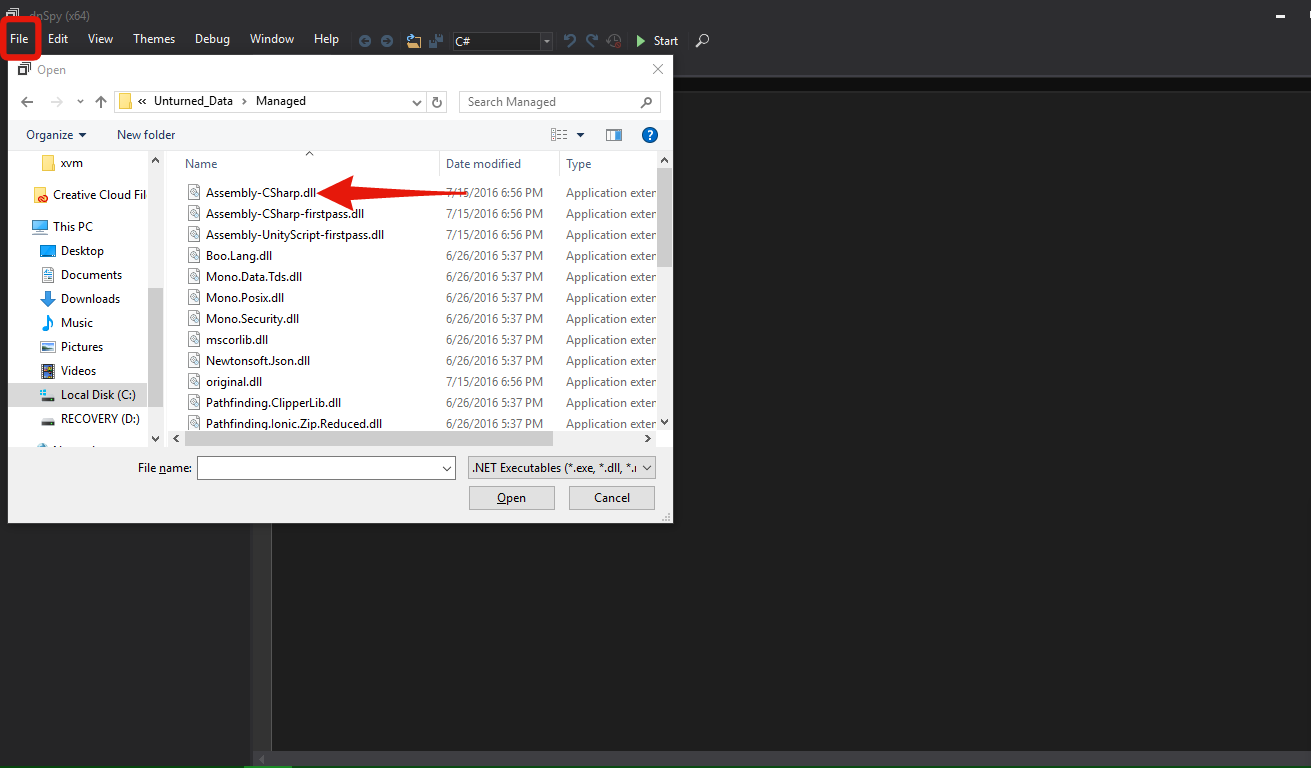
First: Open your decompiler then open Assembly-Csharp.dll found in Unturned_Data/Managed If using DNSpy click File at the top left then click open and navigate to your Unturned folder.
 
Screenshot
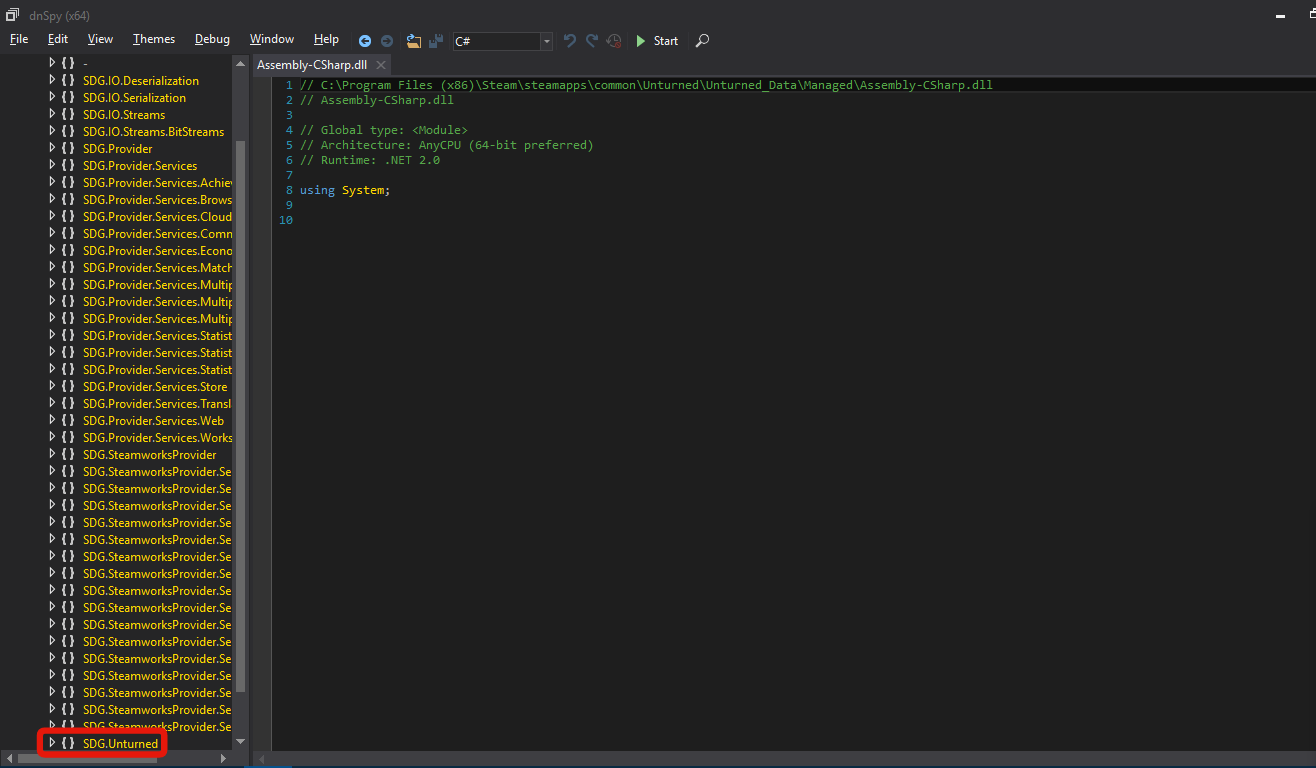
Second: open Assembly-CSharp and Assembly-CSharp.dll then scroll down to SDG.Unturned and open that.
 
Screenshot
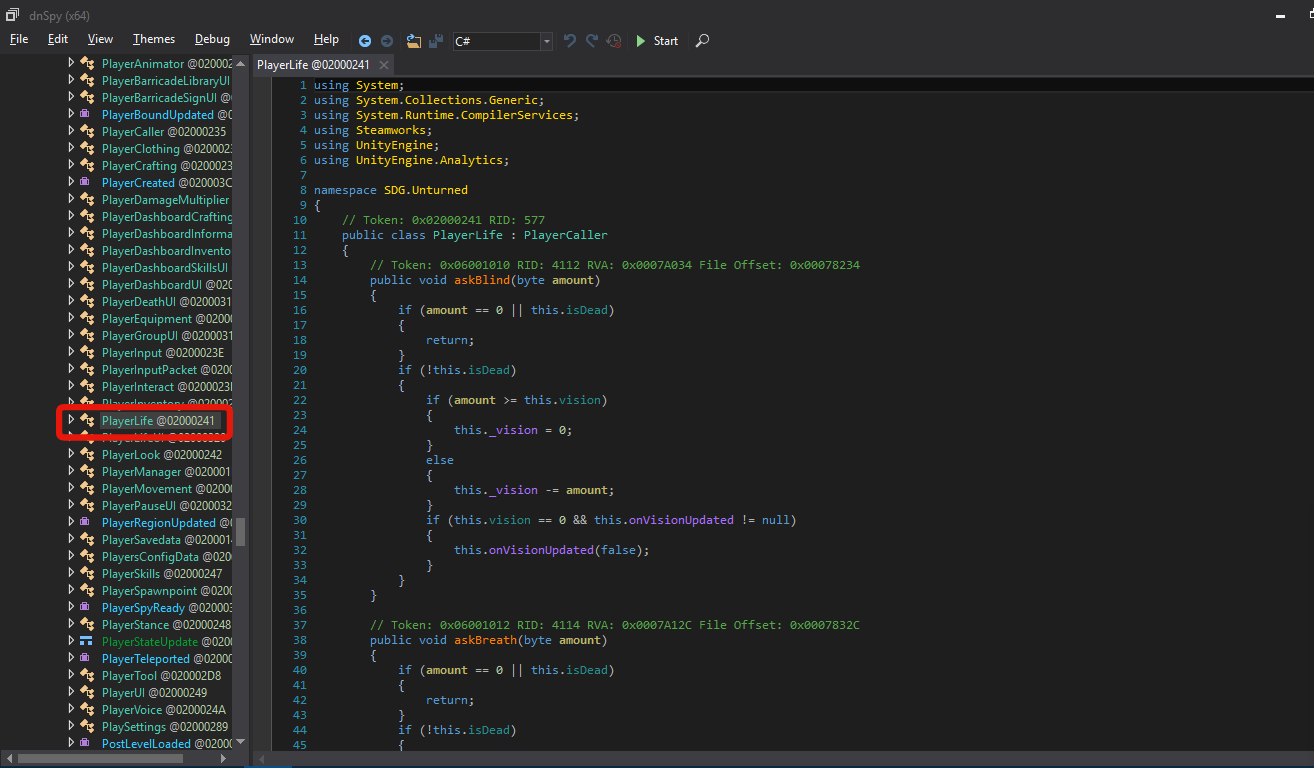
Third: scroll down and find the class PlayerLife
 
Screenshot
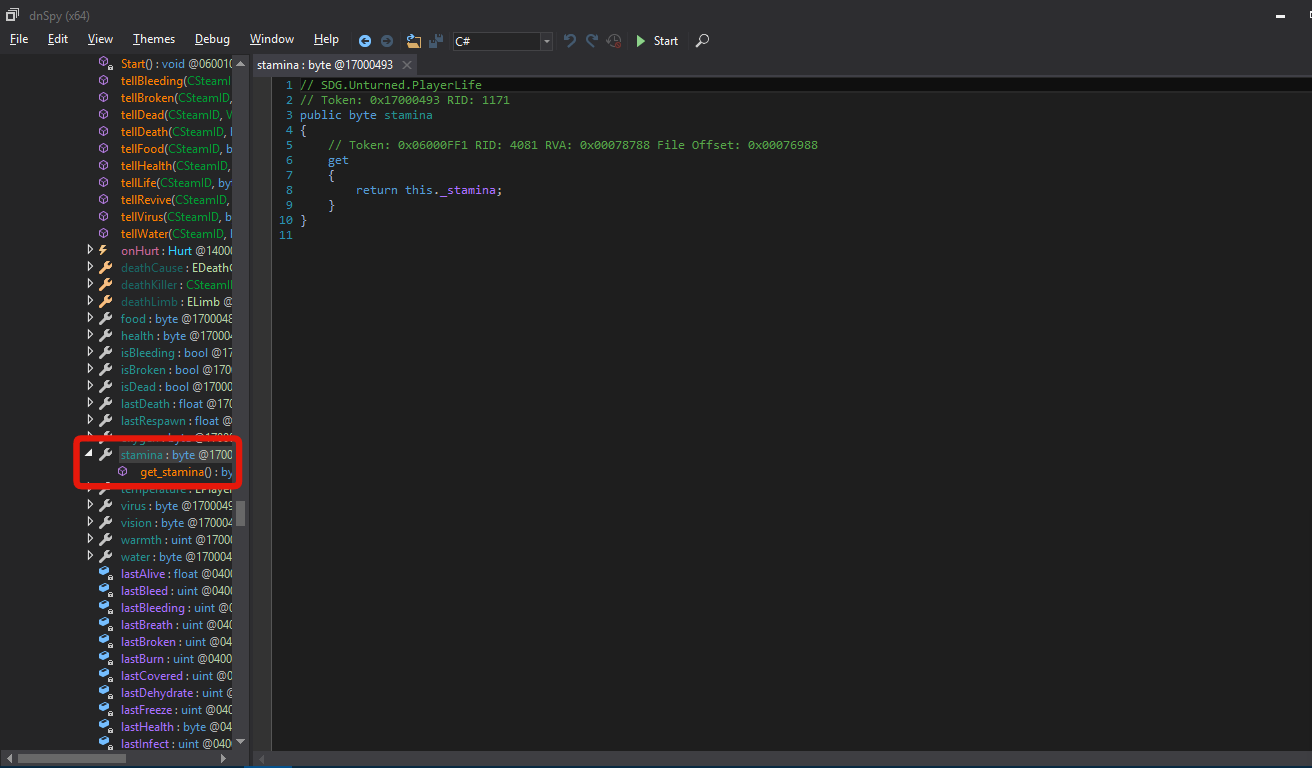
Fourth: scroll down and find the "stamina" byte
 
Screenshot
Fifth: right click on stamina and select "edit IL instructions" your screen should now look like this

Sixth: Press delete to delete all intructions then press A twice to add two new instructions. Left click on the bottom or second "nop" to bring a list of opcodes to choose from. Find and left click on "ret" to select that opcode. Now on the top or first instruction click "nop" and find and left click ldc.i4. Change the operand to 100. Now hit enter and press okay and check the screenshot to see if your screen matches the screenshot. If so you have followed the steps correctly.
 
Screenshot
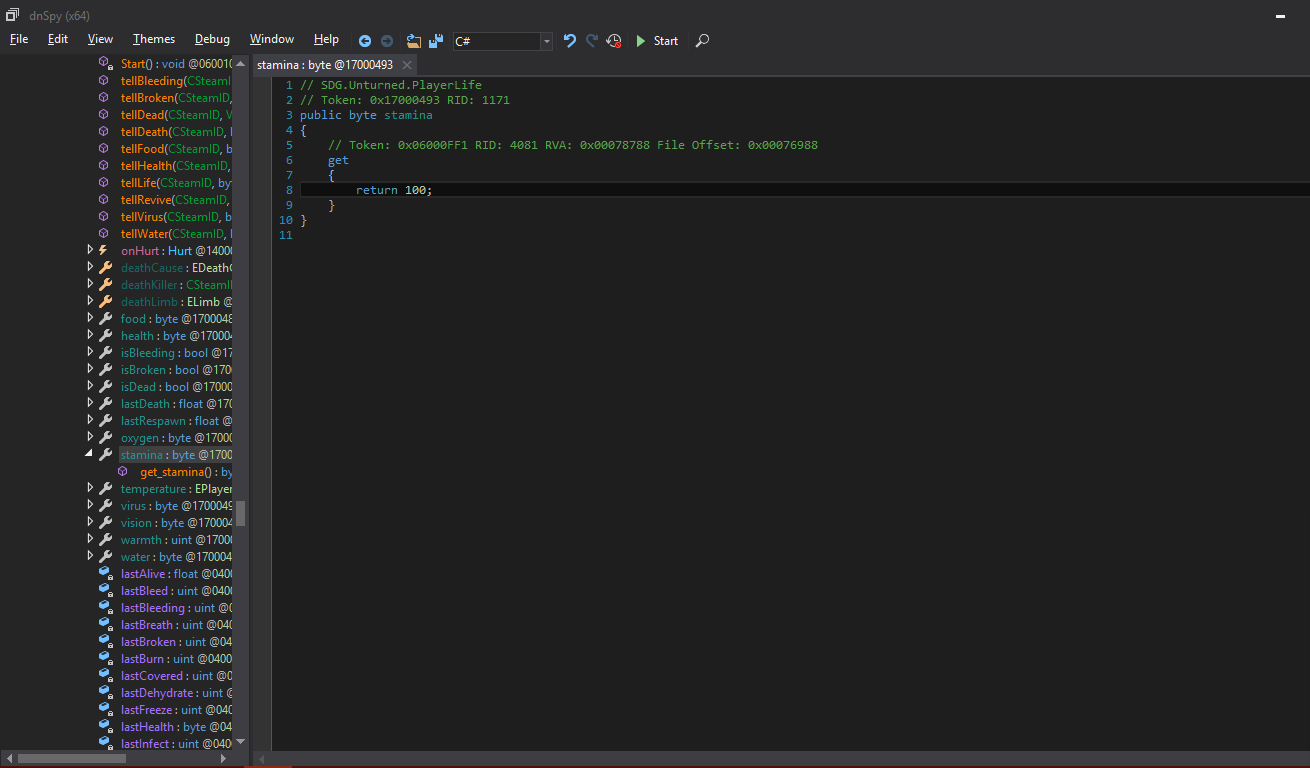
Seventh: Navigate back to the top left and select file > save module > ok to save your modifications and you have successfully given yourself infinite stamina.


Bypassing the server/client assembly comparison

Some of you have tried editing the assembly to make your own hack only to be stopped by the "Server is running a modified version of the game" error when attempting to join servers. In this section we will be bypassing this check in one of two ways that I know of this being changing what file the server assembly is being compared to. In my previous series "Charon" I changed that file to AAA.dll. Fewer screenshots for this because the instructions are basically the same. The second method is the more popular Gorzoid/Kunii method of using Mono.Cecil to write a static hash to the file ( because the server/client file comparison is based on a sha256 digest )

First: Navigate to your Unturned folder outside of your decompiler and copy and paste Assembly-Csharp.dll and rename the copy to something convenient i.e AAA.dll

Second: Navigate to SDG.Unturned inside of your decompiler(not AAA.dll) and find the class "ReadWrite"

Third: Find the byte "appOut" and right click on this > edit IL instructions.

Fourth: Now find the second instruction, or Index 1, or OpCode ldstr and change Assembly-Csharp to AAA. By doing this you are instructing the server to compare it's assembly with your clean copied AAA.dll so that it will find no changes.

Fifth: Save and exit. You can now edit your assembly and play on multiplayer servers.


Fly Hack (singleplayer):

This was included in one of my Charon hacks. This will work on multiplayer servers with CAN_TRUST_CLIENT_MOVEMENT set to true.

First: Navigate to class "PlayerMovement" in SDG.Unturned and find bool "isGrounded"
Second: right click on _isGrounded and edit IL instructions. Delete all and add two new instructions. Change the bottom instruction's opcode to ret and top opcode to ldc.i4.1 and press ok. If your screen now looks like this then you have now made a fly hack.


Misc. edits


Infinite Food (singleplayer):Same as stamina but instead of byte "stamina" find byte "food" and make the same IL instruction edits.

Infinite Health (singleplayer): Same as stamina with byte "health"

Infinite Oxygen (singleplayer): Same as stamina with byte "oxygen"

Infinite Water (singleplayer): Same as stamina with byte "water"

No Broken Bones (singleplayer): Find bool isBroken in class PlayerLife. Edit IL instructions and delete all. Add two new instructions bottom ret and top ldc.i4.0. It should look like this when done

No Bleeding (singleplayer): Same as no broken bones but under bool "isBleeding"

Credit Yourself:
In SDG.Unturned go to class "Provider". Scroll all the way down and find the strings "APP_AUTHOR" and "APP_NAME". Right click on "Unturned" or "Nelson Sexton" and edit IL instructions. Change Nelson Sexton to your name and Unturned to your client name. Save and exit and open unturned to have immediate satisfaction.

Higher Jump and Faster Speed (singleplayer): In SDG.Unturned navigate to class "PlayerMovement" and scroll down to find the float "JUMP". Right click on JUMP and Edit IL Instructions. Change the 7 above JUMP to a higher number to increase your jump. You'll notice that above JUMP are floats SPEED_CLIMB, SPEED_SWIM, etc. You can change the value for each to increase your speed. The values corresponding to each speed are here.

This is pretty much every edit I used in the Charon series and more. Enjoy.
#1 · edited 10y ago · 10y ago
ML
mlpalice
Thx for your work
#2 · 10y ago
Smoke
Smoke
Will put this as a sticky as it may help user's in the present and in the future.
#3 · 10y ago
HU
Hunter
Nice tutorial, keep up the good work, OP.
#4 · 10y ago
Hawkenist
Hawkenist
Thanks for the tutorial! I'll be learning from it. Many thanks!
#5 · 10y ago
Hawkenist
Hawkenist
One last thing, I have downloaded the Zip file and extracted it. I don't know what to do, I don't see any install nor and execution file. Is there something I am missing out on?
#6 · 10y ago
Kr4ken
Kr4ken
Quote Originally Posted by Hawkenist View Post
One last thing, I have downloaded the Zip file and extracted it. I don't know what to do, I don't see any install nor and execution file. Is there something I am missing out on?
Did you download the source code or the release?
#7 · 10y ago
BL
blitzkriegxx
So this is semi-related, I want to override some of the methods at run time, is there a way to do that easily assuming I can load an external DLL? I don't want to go through reflection...

I was looking at an outdated hack on here for a custom /spy (Player::TakeScreenshot()) that custom rendered a screenshot (so hacks don't show). All he did was write a new TakeScreenshot() method. My loader is based in the UnityEngine.dll not in Assembly-CSharp.dll . Anyway to accomplish this? PM me if necessary.

EDIT: Also, after modifying the Assembly, with the only change being the file verification bypass to clean copy, I'm getting the "the server is running a modified assembly" message.
#8 · edited 10y ago · 10y ago
AtiLion
AtiLion
Quote Originally Posted by blitzkriegxx View Post
So this is semi-related, I want to override some of the methods at run time, is there a way to do that easily assuming I can load an external DLL? I don't want to go through reflection...

I was looking at an outdated hack on here for a custom /spy (Player::TakeScreenshot()) that custom rendered a screenshot (so hacks don't show). All he did was write a new TakeScreenshot() method. My loader is based in the UnityEngine.dll not in Assembly-CSharp.dll . Anyway to accomplish this? PM me if necessary.
There is a way to do it but you would need a c++ dlls to replace the code it is called a c# profiler that basically allows you to modify the code at runtime. The other method I am researching atm is by using the resolve event to modify the code before loading it however this is a much more difficult task in unity to accomplish than I thought
#9 · 10y ago
BL
blitzkriegxx
EDIT: Nvm, can't apparently or I'm retarded and can't find the pm function.

I know how I'm going to do it but it's going to be a pain each update (might make an auto-build script or something). I just need to figure out why it's giving me the "The server is running a modified assembly" message despite the fact that I modified the byte[] check.

I have a quick solution for now but i still want to try C# Emission on this. Won't TypeBuilder.DefineMethodOverride do the trick? Write your own method and override the callsign at runtime.
#10 · edited 10y ago · 10y ago
Hawkenist
Hawkenist
Quote Originally Posted by Kr4ken View Post
Did you download the source code or the release?
I think it was the sourcecode where there are bunch of files in a single file. Uhm, Where do I get the release? Tried finding it yet there were only Sourcecode 1 and 2
#11 · 10y ago
jsshou123
jsshou123
Thank You
#12 · 9y ago
Posts 1–12 of 12 · Page 1 of 1

Post a Reply

Similar Threads

  • [Tutorial] Visual Basic Express Edition 2008: Hello WorldBy lilmario876 in Programming Tutorials
    6Last post 16y ago
  • Basic memory editing problem c++ GTABy base187 in C++/C Programming
    4Last post 12y ago
  • i want Microsoft Visual Basic 2010Express EditionBy hazem ahmed in Crossfire Coding Help & Discussion
    6Last post 13y ago
  • Basic memoty edit DLLBy lauwy in CrossFire Hack Coding / Programming / Source Code
    7Last post 15y ago
  • Getting started with C++ DLL hacking - Basic Memory EditingBy Kai13shadow in C++/C Programming
    2Last post 13y ago

Tags for this Thread

None