Hello! I'm looking for a tut that will teach me how to blend my text in my sig and make then more cool... Where Can i find that?
You just have to experiment there's no tutorial except a typography tutorial
Layer > Layer Style
Find some tutorials ...
Posts 1–7 of 7 · Page 1 of 1
Post a Reply
Tags for this Thread
None
No one can teach you how to successfully blend text into your signature. Font is dependent on the layout and flow of your signature and sometimes the theme. It's also dependent on the word; for me I usually write longer words in cursive and shorter words in a standard font. Color is dependent on your signature. Placement usually falls near your render but it can vary. You usually want it close to your point of interest so that the viewer will be able to read it while looking at the main focus point, you do not want your text to grab a viewers attention. Size can vary but you want your main text to stand out.
Basically you just have to play around with it and see what looks right. If it looks awkward, it is awkward.
Here's some examples of things that I did, I'm not a pro but this just gives you an idea of what I'm talking about.
[IMG]http://i238.photobucke*****m/albums/ff303/colby1666/Signatures/RunningOutOfTime.png[/IMG]
For that one I used some darker colors from his hair and gloves because those were main points of interest.
[IMG]http://i238.photobucke*****m/albums/ff303/colby1666/Signatures/Waitingfortheendtocome.png[/IMG]
This one I did in all white because any other color wouldn't have matched or would have been hard to see. I used a cursive font on some words to give it a decorative/formal feel. I also made the text go around the edge of the render to give it some sort of flow.
One thing I would like to also add in is that if you need to change a letter or something to how you want it to look, do it. I changed one of my letters in the last signature to kind of wrap the words together.
Another final thing I would like to add in is that your text (if you're doing more than one word) needs to look like it belongs together, not just pasted next to each other.
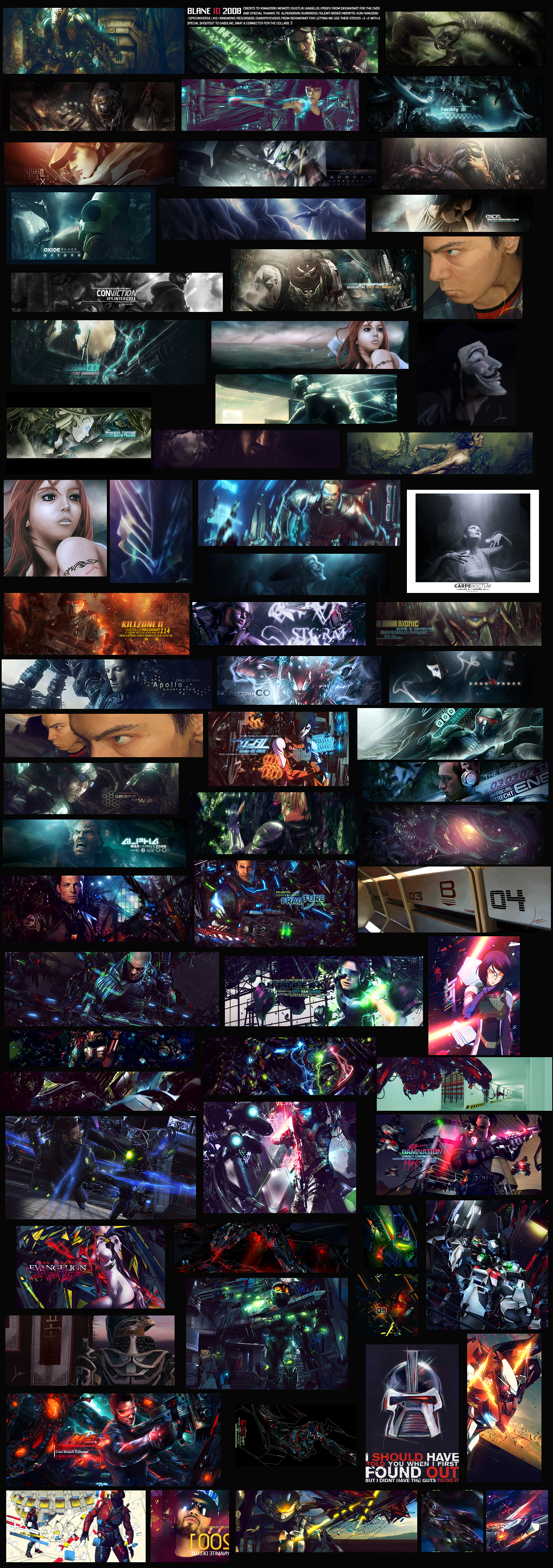
Do it like this and you are a god.
blane text
/nuff said
also ryguy tbh ur text is pretty bad
text is quite simple to do in most cases
its just important to remember that your text should almost always be placed near your focal or else it will be a distraction. The farther away from your focal you put it away, you will have to make your text less of a distraction or not as easily viewable ( make it smaller, lower opacity, shorter )
font is important but not as much as many people turn it out to be. You can make GREAT text with the basic fonts included with windows and i hardly ever use 3rd party fonts. Usually you want a font that is simple, plain, and goes with the theme of the picture.
Im not too good with text colouring so dont ask, and probably the most important factor is style. Text isnt there to just RIP protect your work, its part of it and used to enhance your work. That being said, you need to learn some good designs and text styles. Be creative, use boxes, lines, curves so on and so fourth. Dont bring too much space inbetween your text .
Then there are the fundamental things like you cant put 2 texts, dont split them up and put one on one side and another on the othert side, dont put funky colours, dont use funky texts, dont make the font 40
and one final thing: Text aint a necessity. If you cant make a good text in one sig, just leave it dont add any and instead just make it a tag.