[Tool]NotePad ++
[Tool]NotePad ++
NotePad ++
What is Notepad ++?
What are some of the features offered?
What do the "cool" people call Notepad ++
NPP, so if you have ever seen the term NPP used in a development discussion, this is likely what they are referring too.
NPP supports over 50 languages through the built-in support provided by the Scintilla component.
What if I want to use it for a language not on the list?
NPP's Community offers 'user defined syntax styling', You can get these from their sourceforge page, or you can make your own.
Where can I get plugins?
A list of plugins can be found at their sourceforge plugin page.
Notepad++ Plugins - Browse Files at SourceForge.net
I know C++, Can I make my own plugins?
Yes!
File Attached: Notepad ++ (Portable edition) , There is no need to install this version, just Unzip & Run the Executable.
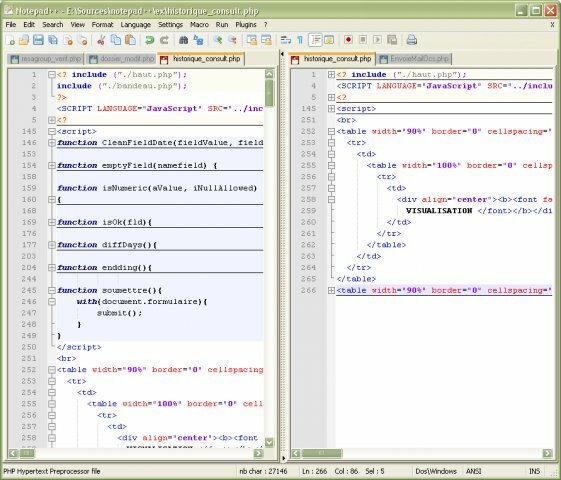
Available Screen Shots.
Virus Scan:
Click Here
What is Notepad ++?
Notepad++ is a text editor and source code editor for Windows, though it can run on Linux and Mac OS X, using software such as Wine. The primary advantage of Notepad++ over the built-in text editor, Notepad, is tabbed editing, to easily work with multiple open files.
- Some of its general features include
- Tabbed document interface
- Drag-and-drop
- Multiple Clipboard (plugin required)
- Split screen editing and synchronized scrolling
- Spell checker (requires Aspell) (Spell checker does not distinguish between text and code)
- Supports text encoding formats such as Unicode, for international writing systems
- Find and replace over multiple documents
- File comparison
- Zooming
- It also includes features for source code editing:
- Auto-completion
- Bookmarks
- Syntax highlighting and syntax folding
- Brace and indent highlighting
- Regular expression find and replace
- Speech synthesis
- FTP Browser (plug-in included in standard installation)
- Macro recording and execution.
- Various tools such as line sorting, text encoding conversion, text folding
- File status auto-detection
- Plugins for multiline regular expression search and replace
What do the "cool" people call Notepad ++
NPP, so if you have ever seen the term NPP used in a development discussion, this is likely what they are referring too.
NPP supports over 50 languages through the built-in support provided by the Scintilla component.
What if I want to use it for a language not on the list?
NPP's Community offers 'user defined syntax styling', You can get these from their sourceforge page, or you can make your own.
Where can I get plugins?
A list of plugins can be found at their sourceforge plugin page.
Notepad++ Plugins - Browse Files at SourceForge.net
I know C++, Can I make my own plugins?
Yes!
Here are the instructions to make your first Notepad++ plugin in less 10 minutes, by following 6 steps:
Download and unzip Notepad++ Plugin Template.
Open NppPluginTemplate.vcproj in your Visual Studio.
Define your plugin name in PluginDefinition.h
Define your plugin commands number in PluginDefinition.h
Customize plugin commands names and associated function name (and the other stuff, optional) in PluginDefinition.cpp.
Define the associated functions.
You are guided by the following comments in both PluginDefinition.h and PluginDefinition.cpp files:
//-- STEP 1. DEFINE YOUR PLUGIN NAME --//
//-- STEP 2. DEFINE YOUR PLUGIN COMMAND NUMBER --//
//-- STEP 3. CUSTOMIZE YOUR PLUGIN COMMANDS --//
//-- STEP 4. DEFINE YOUR ASSOCIATED FUNCTIONS --//
Download and unzip Notepad++ Plugin Template.
Open NppPluginTemplate.vcproj in your Visual Studio.
Define your plugin name in PluginDefinition.h
Define your plugin commands number in PluginDefinition.h
Customize plugin commands names and associated function name (and the other stuff, optional) in PluginDefinition.cpp.
Define the associated functions.
You are guided by the following comments in both PluginDefinition.h and PluginDefinition.cpp files:
//-- STEP 1. DEFINE YOUR PLUGIN NAME --//
//-- STEP 2. DEFINE YOUR PLUGIN COMMAND NUMBER --//
//-- STEP 3. CUSTOMIZE YOUR PLUGIN COMMANDS --//
//-- STEP 4. DEFINE YOUR ASSOCIATED FUNCTIONS --//
File Attached: Notepad ++ (Portable edition) , There is no need to install this version, just Unzip & Run the Executable.
Available Screen Shots.
Virus Scan:
Click Here
 ,@
,@ Yay!
Yay! Originally Posted by markO1O8
