Home › Forum › MultiPlayer Game Hacks & Cheats › Battlefield Hacks & Cheats › Battlefield 3 (BF3) Hacks & Cheats › Realmware Battlefield 3 Tools
Realmware Battlefield 3 Tools
Realmware Battlefield 3 Settings Tool
I didn't found thread about these programs, so I thought I can collect everything in one thread 
I DO NOT OWN THIS PROGRAM. ALL CREDITS TO REALMWARE
[img]http://clip2ne*****m/clip/m94339/1332839677-clip-76kb.png[/img]
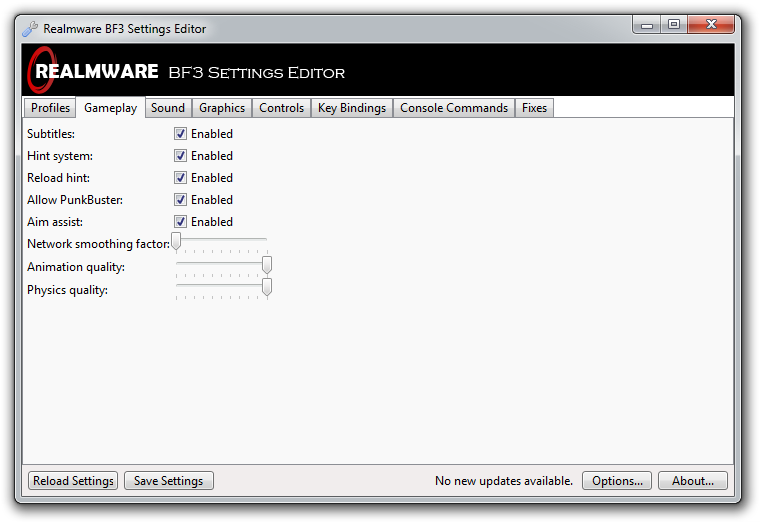
Realmware BF3 Settings Editor is a useful tool which allows you to tweak a great number of Battlefield 3 settings. This page lists each and every feature of the program. It is noob-friendly and can you help you return back to normal if something went wrong.
As for me -- this program is beast. Very easy to use, can change many BF3 settings and much more.
It very easy to use!
=Your Battlefield 3 settings will be automatically loaded and saved.
=You will be automatically notified about any new updates for BF3 Settings Editor.
=Change your settings through an intuitive graphical user interface.
=Helpful tooltips explain the purpose and effect of each setting.
Convenient!
=You can change your settings without wasting time launching the game.
Safe!
=A backup of your settings will be automatically created on the first run.
Powerful!
=Supports the majority of standard game settings.
=Bypass in-game limits, such as the field of view being limited to 60-90.
=Tweak hidden settings and key bindings.
=Apply fixes for various game bugs and issues.
=Store multiple settings files with the built-in profile manager.
Customisable!
=Two different themes are included: Standard and Dark.
=Choose from the following languages: English (UK), English (US), and Chinese.
=Minimise BF3 Settings Editor to either the taskbar or the system tray.
Does DICE approve of and allow this tool?
DICE has not made any official statement about BF3 Settings Editor; however, they are aware that it exists and is in use by many players. It is unlikely that they would officially approve it as it is a third-party tool, but it is also very unlikely that they would decide to disallow it. A DICE employee even posted to say it was a "cool tool" and give us advice to help us improve it.
Will this get me kicked or banned by PunkBuster?
No. BF3 Settings Editor is entirely safe — you will not get into any trouble with PunkBuster. BF3 Settings Editor only modifies your Battlefield 3 settings files; it does not touch the core game files in any way, nor does it make any modifications to the running game. There are many players using this tool, and none of them have reported any issues with PunkBuster.
I see an "aim assist" setting! Is this a hack?
No, this is not a hack. As explained within BF3 Settings Editor, the aim assist setting only affects single-player and co-op modes; it is already enabled in Battlefield 3 by default, so all you can do is turn it off. It does nothing in ordinary multiplayer games (where aim assist is always disabled) and is therefore not a hack. We only support legitimate changes, and nothing in BF3 Settings Editor will cause you to get banned — it's completely safe.
Why do I get an error, "The application was unable to start correctly"?
This is a known issue which affects a small minority of our users. It is possibly related to security software, such as ZoneAlarm. We are investigating this and will try to resolve it from our end if at all possible. Check back later for an update, or contact us to request a modified version of BF3 Settings Editor which includes a workaround for this.
My Xbox 360 controller does not get recognised properly. Why?
We have received a few reports about Xbox 360 controllers not binding properly within BF3 Settings Editor and showing different button names to the actual game. It seems that Xbox 360 controllers are handled by Battlefield 3 in a special way, different to any other joystick/gamepad, and that is why this issue occurs. We are working on getting an Xbox 360 controller to test with — expect a fix soon!
Something's gone wrong! How do I restore my settings?
BF3 Settings Editor automatically creates a backup of your settings files the first time it is run. To restore this backup, simply navigate to the profile manager in BF3 Settings Editor by clicking "Profiles", select the backup profile in the list of profiles, and then click the "Load Profile" button at the bottom. This will load your backup settings into BF3 Settings Editor; to save them back to Battlefield 3, just click the "Save Settings" button in the status bar.
Do you have any plans for supporting kit loadouts?
Yes, we do! We have already started implementing this and it will certainly be added to a future version of BF3 Settings Editor. We are considering including a random kit generator, and we may also display the stats of your selected weapons and attachments.
Screenshots:



SHA256: d49f242fe137d5d2264abd59b2270dcbecd3033198fd55be76 2b386ab58c6667
File name: BF3SE-2.3.rar
Detection ratio: 0 / 42
Analysis date: 2012-03-27 09:40:42 UTC ( 1 minute ago )
Antivirus Result Update
AhnLab-V3 - 20120326
AntiVir - 20120327
Antiy-AVL - 20120327
Avast - 20120326
AVG - 20120327
BitDefender - 20120327
ByteHero - 20120327
CAT-QuickHeal - 20120327
ClamAV - 20120327
Commtouch - 20120327
Comodo - 20120327
DrWeb - 20120327
Emsisoft - 20120327
eSafe - 20120326
eTrust-Vet - 20120327
F-Prot - 20120327
F-Secure - 20120327
Fortinet - 20120327
GData - 20120327
Ikarus - 20120327
Jiangmin - 20120326
K7AntiVirus - 20120326
Kaspersky - 20120327
McAfee - 20120327
McAfee-GW-Edition - 20120326
Microsoft - 20120327
NOD32 - 20120327
Norman - 20120327
nProtect - 20120327
Panda - 20120326
PCTools - 20120326
Rising - 20120327
Sophos - 20120327
SUPERAntiSpyware - 20120323
Symantec - 20120327
TheHacker - 20120326
TrendMicro - 20120327
TrendMicro-HouseCall - 20120327
VBA32 - 20120327
VIPRE - 20120327
ViRobot - 20120327
VirusBuster - 20120323
Jotti's Malware Scan: http://virusscan.jotti.org/en/scanre...33f1df4e5a3952
I DO NOT OWN THIS PROGRAM. ALL CREDITS TO REALMWARE
[img]http://clip2ne*****m/clip/m94339/1332839677-clip-76kb.png[/img]
Realmware BF3 Settings Editor is a useful tool which allows you to tweak a great number of Battlefield 3 settings. This page lists each and every feature of the program. It is noob-friendly and can you help you return back to normal if something went wrong.
As for me -- this program is beast. Very easy to use, can change many BF3 settings and much more.
It very easy to use!
=Your Battlefield 3 settings will be automatically loaded and saved.
=You will be automatically notified about any new updates for BF3 Settings Editor.
=Change your settings through an intuitive graphical user interface.
=Helpful tooltips explain the purpose and effect of each setting.
Convenient!
=You can change your settings without wasting time launching the game.
Safe!
=A backup of your settings will be automatically created on the first run.
Powerful!
=Supports the majority of standard game settings.
=Bypass in-game limits, such as the field of view being limited to 60-90.
=Tweak hidden settings and key bindings.
=Apply fixes for various game bugs and issues.
=Store multiple settings files with the built-in profile manager.
Customisable!
=Two different themes are included: Standard and Dark.
=Choose from the following languages: English (UK), English (US), and Chinese.
=Minimise BF3 Settings Editor to either the taskbar or the system tray.
FAQ
Does DICE approve of and allow this tool?
DICE has not made any official statement about BF3 Settings Editor; however, they are aware that it exists and is in use by many players. It is unlikely that they would officially approve it as it is a third-party tool, but it is also very unlikely that they would decide to disallow it. A DICE employee even posted to say it was a "cool tool" and give us advice to help us improve it.
Will this get me kicked or banned by PunkBuster?
No. BF3 Settings Editor is entirely safe — you will not get into any trouble with PunkBuster. BF3 Settings Editor only modifies your Battlefield 3 settings files; it does not touch the core game files in any way, nor does it make any modifications to the running game. There are many players using this tool, and none of them have reported any issues with PunkBuster.
I see an "aim assist" setting! Is this a hack?
No, this is not a hack. As explained within BF3 Settings Editor, the aim assist setting only affects single-player and co-op modes; it is already enabled in Battlefield 3 by default, so all you can do is turn it off. It does nothing in ordinary multiplayer games (where aim assist is always disabled) and is therefore not a hack. We only support legitimate changes, and nothing in BF3 Settings Editor will cause you to get banned — it's completely safe.
Why do I get an error, "The application was unable to start correctly"?
This is a known issue which affects a small minority of our users. It is possibly related to security software, such as ZoneAlarm. We are investigating this and will try to resolve it from our end if at all possible. Check back later for an update, or contact us to request a modified version of BF3 Settings Editor which includes a workaround for this.
My Xbox 360 controller does not get recognised properly. Why?
We have received a few reports about Xbox 360 controllers not binding properly within BF3 Settings Editor and showing different button names to the actual game. It seems that Xbox 360 controllers are handled by Battlefield 3 in a special way, different to any other joystick/gamepad, and that is why this issue occurs. We are working on getting an Xbox 360 controller to test with — expect a fix soon!
Something's gone wrong! How do I restore my settings?
BF3 Settings Editor automatically creates a backup of your settings files the first time it is run. To restore this backup, simply navigate to the profile manager in BF3 Settings Editor by clicking "Profiles", select the backup profile in the list of profiles, and then click the "Load Profile" button at the bottom. This will load your backup settings into BF3 Settings Editor; to save them back to Battlefield 3, just click the "Save Settings" button in the status bar.
Do you have any plans for supporting kit loadouts?
Yes, we do! We have already started implementing this and it will certainly be added to a future version of BF3 Settings Editor. We are considering including a random kit generator, and we may also display the stats of your selected weapons and attachments.
Screenshots:
Profile Manager
Gameplay Tab
Sound Tab
Graphics Tab
http://bf3.realmware.co.uk/settings-editor/images/v2.3/standard-graphics.png[img][/img]
Controls Tab
Key Bindings Tab
Console Commands Tab
Fixes Tab
VirusTotal Scan
SHA256: d49f242fe137d5d2264abd59b2270dcbecd3033198fd55be76 2b386ab58c6667
File name: BF3SE-2.3.rar
Detection ratio: 0 / 42
Analysis date: 2012-03-27 09:40:42 UTC ( 1 minute ago )
Antivirus Result Update
AhnLab-V3 - 20120326
AntiVir - 20120327
Antiy-AVL - 20120327
Avast - 20120326
AVG - 20120327
BitDefender - 20120327
ByteHero - 20120327
CAT-QuickHeal - 20120327
ClamAV - 20120327
Commtouch - 20120327
Comodo - 20120327
DrWeb - 20120327
Emsisoft - 20120327
eSafe - 20120326
eTrust-Vet - 20120327
F-Prot - 20120327
F-Secure - 20120327
Fortinet - 20120327
GData - 20120327
Ikarus - 20120327
Jiangmin - 20120326
K7AntiVirus - 20120326
Kaspersky - 20120327
McAfee - 20120327
McAfee-GW-Edition - 20120326
Microsoft - 20120327
NOD32 - 20120327
Norman - 20120327
nProtect - 20120327
Panda - 20120326
PCTools - 20120326
Rising - 20120327
Sophos - 20120327
SUPERAntiSpyware - 20120323
Symantec - 20120327
TheHacker - 20120326
TrendMicro - 20120327
TrendMicro-HouseCall - 20120327
VBA32 - 20120327
VIPRE - 20120327
ViRobot - 20120327
VirusBuster - 20120323
Jotti's Malware Scan: http://virusscan.jotti.org/en/scanre...33f1df4e5a3952