Home › Forum › MultiPlayer Game Hacks & Cheats › Steam Games Hacks & Cheats › ShellShock Live - AUTO Aimbot - Weapon Variations - [&Source Code]
ShellShock Live - AUTO Aimbot - Weapon Variations - [&Source Code]
ShellShock Live - AUTO Aimbot - Weapon Variations - [&Source Code]
How To Use:
Have ShellShock Live opened with the screen resolution of 1680x1050 (THIS IS VERY IMPORTANT). The application will automatically overlay itself on top of the game.
Activate Tracker / Tracer:
1. Join a game
2. To activate the tracker, press the top scan button when your aiming circle is not visible
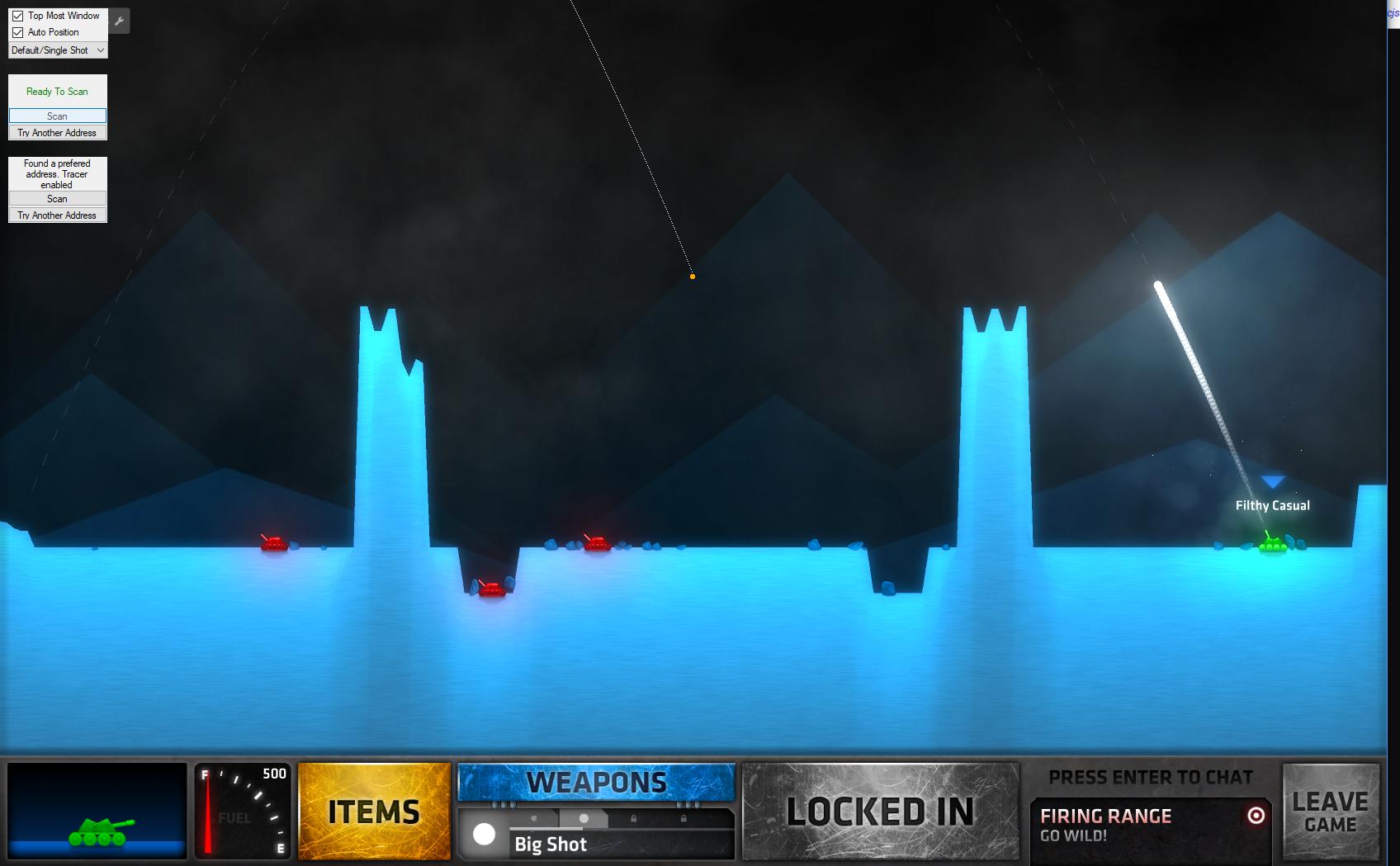

3. To activate the tracer, set your angle to 45 aiming to the left. Set your power to 100 then press the bottom scan button:

I moved the orange dot from the top left corner manually (using the "Auto Position" checkbox option and dragging it) to show the tracer better

4. If either the tracer or tracker are not showing up correctly, press the "Try Another Address" button for whichever is wrong. Do this slowly, if you go too fast you'll have to restart the process again for whichever you pressed.
TODO List:
Important Notes:
Supported Weapons (Varying degrees of accuracy)
Have ShellShock Live opened with the screen resolution of 1680x1050 (THIS IS VERY IMPORTANT). The application will automatically overlay itself on top of the game.
Activate Tracker / Tracer:
1. Join a game
2. To activate the tracker, press the top scan button when your aiming circle is not visible
Tracker Images
3. To activate the tracer, set your angle to 45 aiming to the left. Set your power to 100 then press the bottom scan button:
Tracer Images
I moved the orange dot from the top left corner manually (using the "Auto Position" checkbox option and dragging it) to show the tracer better
4. If either the tracer or tracker are not showing up correctly, press the "Try Another Address" button for whichever is wrong. Do this slowly, if you go too fast you'll have to restart the process again for whichever you pressed.
TODO List:
- Make tracer more accurate
- Factor for wind
Important Notes:
- The follower code only works reliably (during my tests) if you are the one hosting the match. It may work in other player slots but it is sketchy at best.
- Tested and confirmed working on multiple computers 4/21-4/27/2017
- The tracer is not 100% accurate, err on the side of caution when aiming. Practice in the firing range first to get a hang of it. The tracer tends to undershoot at lower angles and overshoot at steeper angles. I chose a middle ground for values that would work the best overall.
Supported Weapons (Varying degrees of accuracy)
- Default/Single Shot
- 3 Ball
- 5 Ball / 3000 Counter
- Rainbow
- Yin-Yang
- Payload
 Originally Posted by shllshck


